
MarcOT - My Graphics Setup
infoAbout This Title
A lot of you have asked about the graphics in my Euro Truck Simulator 2 videos, so I’ve put together an overview of the setup I currently use.
I’ll keep this post updated whenever something changes, so you can always come back here to see my latest setup.
Graphics Mods & ReShade
My current graphics setup combines:
Project Next-Gen (PNG)
JBX Graphics 3
Snowymoon
ReShade by Angus May
TM Realistic Rain
For ReShade, I currently use Angus May’s RealEye_Smooth_Neutral.ini preset.
These mods, together with my in-game settings, create the overall visual style you see in my videos.
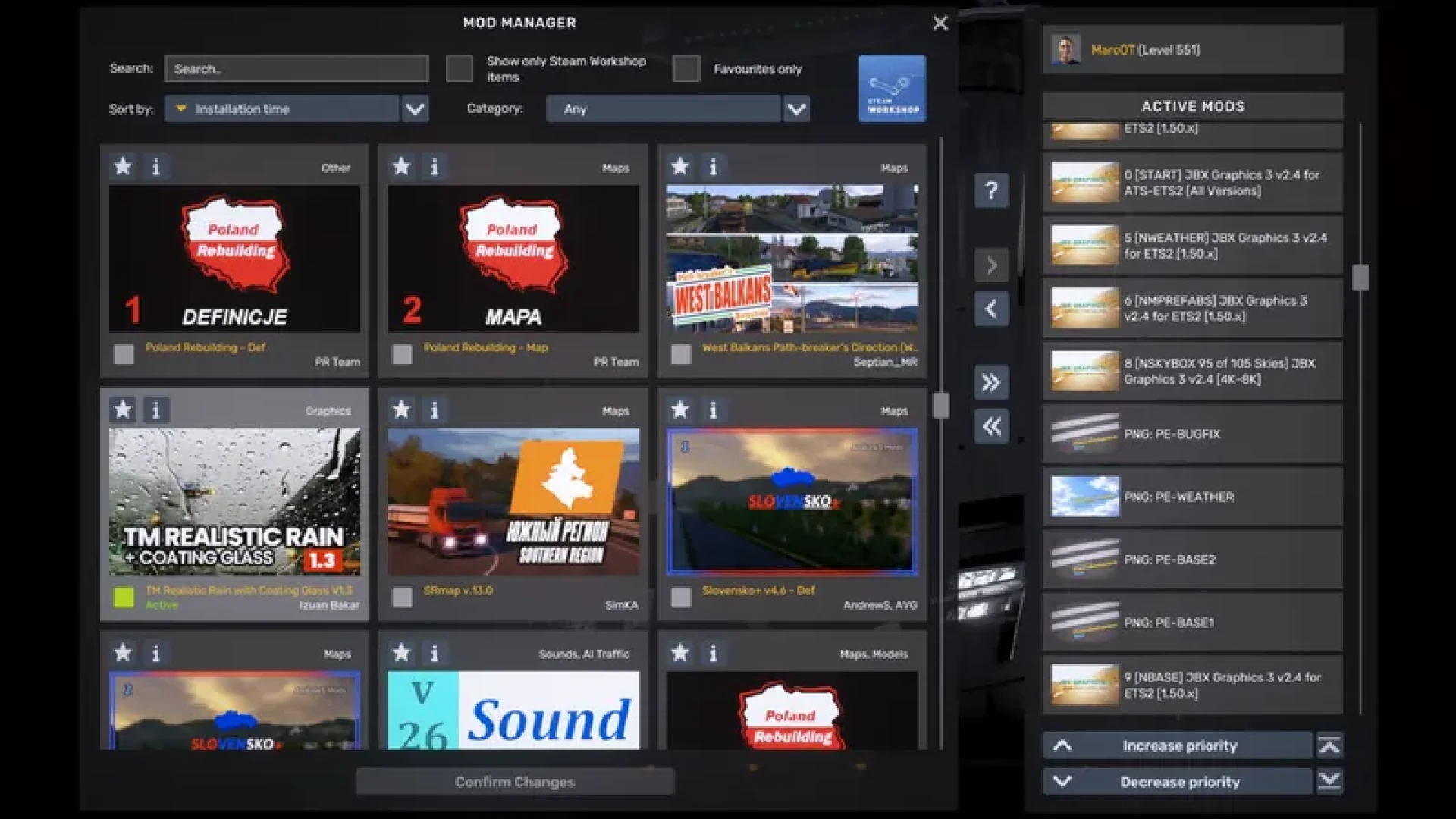
My Graphics Settings & Mod Load Order
I’ve attached screenshots showing my current:
ETS2 graphics settings
Snowymoon settings
Mod load order
The screenshots reflect the configuration I currently use. If I change anything, I’ll update them here.
Weather & Skyboxes
I usually keep the rain probability between 15% and 25%. (recent change, before I had 0%)
I also like using the developer console to change skyboxes manually. One of my preferred options is:
g_set_skybox 3
However, I’ve increasingly been letting the game choose the skyboxes naturally. So the lighting and sky you see may vary from video to video.
My PC Specs
For reference, this is the PC I use to record my videos:
GPU: NVIDIA GeForce RTX 5080
CPU: AMD Ryzen 9 9950X3D
RAM: 64 GB DDR5
Please keep my hardware in mind when trying these settings yourself. Using the same mods and graphics settings on a different PC may result in different performance.
I also use an OLED monitor, so colours, contrast and brightness may appear slightly different on your display.
Downloads & Creator Links
You can find the graphics mods and tools mentioned above through their respective creators:
JBX Graphics 3https://www.jbxgraphicsmods.com/
Project Next-Gen (PNG) – DamianSVWhttps://www.facebook.com/DamianSVW
ReShade – Angus Mayhttps://www.patreon.com/AngusMay
Snowymoonhttps://snowymoon.io/
TM Realistic Rainhttps://izuanbakar.gumroad.com/l/tmrealrain
All links lead to the respective creators or their websites. No third-party mod files are included in this post.
Future Updates
I’m planning to experiment with DLSS 5, but it is not currently part of the graphics setup used in my videos.
If I decide to integrate it into my regular recording setup, I’ll update this post accordingly.
The same applies to any future changes to my graphics mods, ReShade preset, settings or mod load order.
This post will always reflect my current graphics setup.
— MarcOT
A lot of you have asked about the graphics in my Euro Truck Simulator 2 videos, so I’ve put together an overview of the setup I currently use.
I’ll keep this post updated whenever something changes, so you can always come back here to see my latest setup.
Graphics Mods & ReShade
My current graphics setup combines:
Project Next-Gen (PNG)
JBX Graphics 3
Snowymoon
ReShade by Angus May
TM Realistic Rain
For ReShade, I currently use Angus May’s RealEye_Smooth_Neutral.ini preset.
These mods, together with my in-game settings, create the overall visual style you see in my videos.
My Graphics Settings & Mod Load Order
I’ve attached screenshots showing my current:
ETS2 graphics settings
Snowymoon settings
Mod load order
The screenshots reflect the configuration I currently use. If I change anything, I’ll update them here.
Weather & Skyboxes
I usually keep the rain probability between 15% and 25%. (recent change, before I had 0%)
I also like using the developer console to change skyboxes manually. One of my preferred options is:
g_set_skybox 3
However, I’ve increasingly been letting the game choose the skyboxes naturally. So the lighting and sky you see may vary from video to video.
My PC Specs
For reference, this is the PC I use to record my videos:
GPU: NVIDIA GeForce RTX 5080
CPU: AMD Ryzen 9 9950X3D
RAM: 64 GB DDR5
Please keep my hardware in mind when trying these settings yourself. Using the same mods and graphics settings on a different PC may result in different performance.
I also use an OLED monitor, so colours, contrast and brightness may appear slightly different on your display.
Downloads & Creator Links
You can find the graphics mods and tools mentioned above through their respective creators:
JBX Graphics 3https://www.jbxgraphicsmods.com/
Project Next-Gen (PNG) – DamianSVWhttps://www.facebook.com/DamianSVW
ReShade – Angus Mayhttps://www.patreon.com/AngusMay
Snowymoonhttps://snowymoon.io/
TM Realistic Rainhttps://izuanbakar.gumroad.com/l/tmrealrain
All links lead to the respective creators or their websites. No third-party mod files are included in this post.
Future Updates
I’m planning to experiment with DLSS 5, but it is not currently part of the graphics setup used in my videos.
If I decide to integrate it into my regular recording setup, I’ll update this post accordingly.
The same applies to any future changes to my graphics mods, ReShade preset, settings or mod load order.
This post will always reflect my current graphics setup.
— MarcOT
groupArtist
 1k+
MarcOTverified
photo_library5 albums
visibility12.5K views
View Profile arrow_forward
1k+
MarcOTverified
photo_library5 albums
visibility12.5K views
View Profile arrow_forward
Comments (0)