
Page 1 failed to load.
DigiBitPlay - (Free Version) NEW V5 UPDATE
 Up next
Stickyspoodge - All Those Years Later Begins!
Up next
Stickyspoodge - All Those Years Later Begins!
About This Title
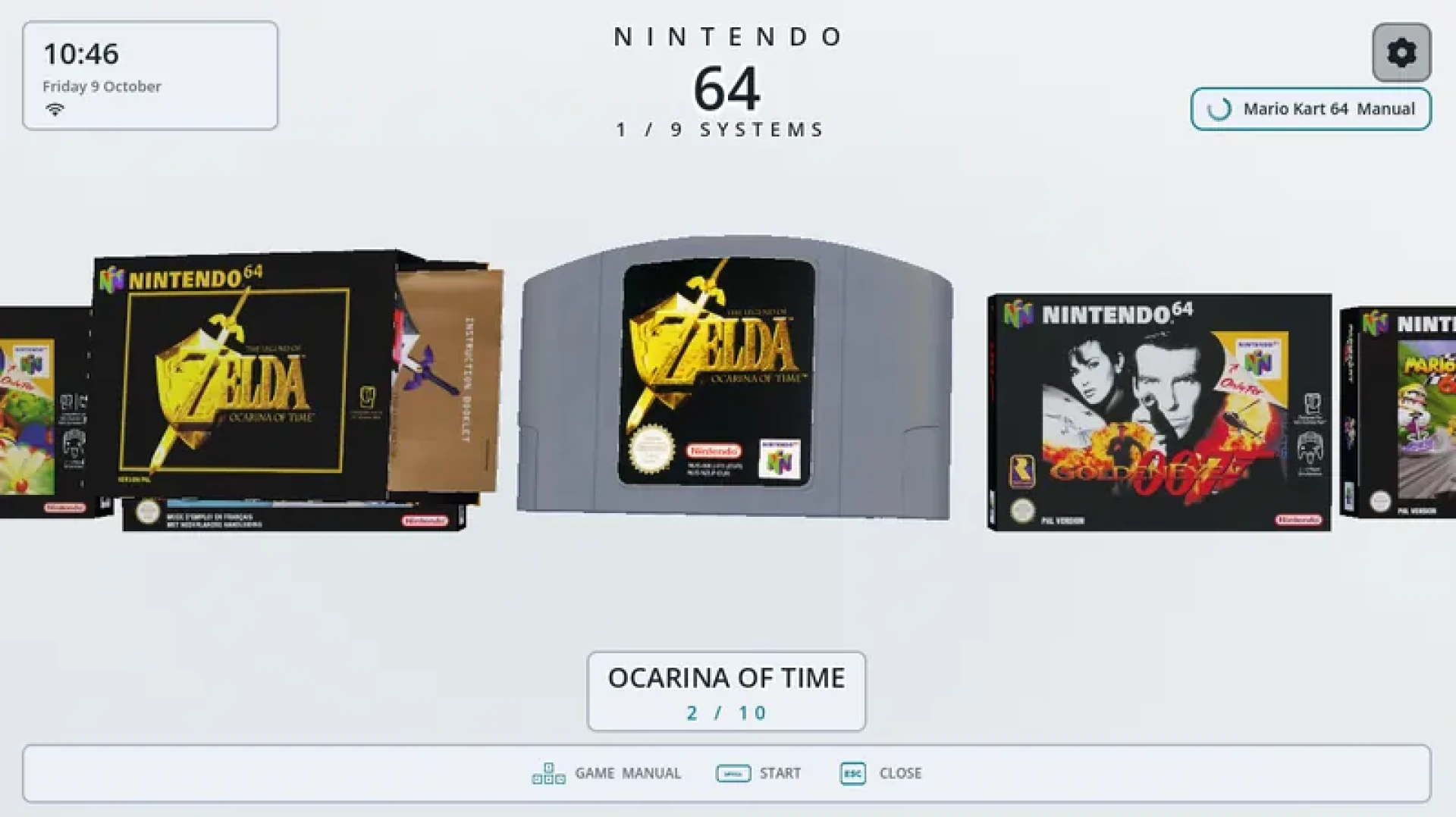
The V5 Free Build is here with a completely new 2D view mode, improved game manuals, more customization options, updated animations, better performance, and several UI improvements and bug fixes.
The free version supports 9 gaming systems.
SUPPORTED GAMING SYSTEMSGame Boy (GB)
Game Boy Color (GBC)
Game Boy Advance (GBA)
PlayStation 1 (PS1)
PlayStation 2 (PS2)
Nintendo 64 (N64)
Nintendo GameCube (GC)
Nintendo Switch
Android Games
NEW VIEW MODESNew 2D View Mode: Added a completely new 2D interface for users who prefer a traditional gaming frontend without 3D models. Choose between Grid, List, and Carousel layouts. Switch between 2D and 3D under Settings > Looks > Appearance > View.
3D & VISUAL IMPROVEMENTSNew Cartridge Colors: Added new cartridge color options, including glitter effects and transparent plastic inspired by real retro cartridges. Customize individual cartridges under Settings > Right now > This game > Colour & plastic.
Cartridges Inside Handhelds: GB, GBC, and GBA cartridges now appear inside their respective handheld consoles. Your last selected game appears inserted into the handheld when browsing your consoles.
Improved Cartridge Animations: Cartridges now feature smoother falling animations instead of simply rotating toward the bottom of the screen.
Improved Game Launch Animation: Removed the brief stutter and white flash before launching games. Games now fall downward while a black gradient transitions onto the screen.
Brighter GBA Colors: Adjusted the GBA console colors to appear slightly brighter, especially the grey model.
Game Box Fixes: Fixed visible gaps in certain game boxes when zooming in closely.
GAME MANUALS & CONTROLSMore Game Manuals: Added and improved manual support for GB, GBC, GBA, PS1, PS2, N64, and GameCube.
Manual Page Reordering: Improved the manual editing interface. Press Y while viewing a manual to open the editing options and rearrange pages.
Manual Page Physics: Added subtle corner movement when rotating manuals, giving the pages a more natural appearance.
Full Manual Rotation: Manuals now support free rotation, allowing you to inspect their front and back covers from different angles.
Improved Zoom Controls: Use L2 and R2 to zoom in and out when inspecting games and manuals.
Pinch to Zoom: Added pinch-to-zoom support for manuals on touchscreen devices.
Clickable Game Manuals: Open manuals directly by clicking on them inside game cases without navigating through a controller.
UI, SETTINGS & ACHIEVEMENTSImproved Settings Layout: Reorganized the settings interface to make different options easier to find and navigate.
Easier Hidden Game Management: Added a dedicated section for hidden games. Search for hidden games and restore individual games or all hidden games under Settings > Content > Collections & hidden > Hidden games.
More UI Visibility Options: Choose which interface elements appear on your screen, including game titles, counters, achievements, controls, and other information. Find these options under Settings > Looks > Appearance > Visible UI.
Improved Intro Setup: Completely overhauled the initial setup experience with a cleaner layout and easier navigation.
RetroAchievements Profile: Added your RetroAchievements profile to the top of the interface. Open your profile directly from the main UI to view your information and achievements. Sign in under Settings > Content > Achievements.
Game Achievement Progress: Games with RetroAchievements support now display a trophy indicator. Press Down on your controller, navigate to the highlighted achievement box, and press Enter to view your progress and unlocked achievements.
Improved Artwork Scraper: Redesigned the scraper interface with a cleaner layout and a new progress bar showing artwork download progress. Press X on a selected game to open the scraper options. Additional artwork settings are available under Settings > Looks > Artwork.
PERFORMANCE, AUDIO & BUG FIXESPerformance Optimization: Improved navigation performance for larger game libraries with more 3D models. Several optimizations help reduce performance issues.
Authentic Handheld Sounds: Added new game box opening sounds for GB, GBC, and GBA. The sounds were recorded from a real GBA game box for a more authentic experience. Adjust audio preferences under Settings > App > Sound & controls.
New Ambient Soundtrack: Added a new ambient music track created by Soheil. Choose your preferred music under Settings > App > Sound & controls > Ambience music.
Additional Fixes: Made several smaller improvements to visuals, navigation, animations, and the interface throughout DigiBitPlay.
WHAT I NEED FROM YOUDigiBitPlay V5 is still a work in progress, so some bugs and unexpected issues might occur, especially with the new 2D view mode.
If you experience problems, please report them with as much detail as possible, including your device, the console or game involved, and the steps leading to the issue.
You are also welcome to report bugs in our Discord server, helping us keep track of issues and prioritize future fixes.
Your feedback helps improve DigiBitPlay and future updates.
Thank you for supporting DigiBitPlay!
The V5 Free Build is here with a completely new 2D view mode, improved game manuals, more customization options, updated animations, better performance, and several UI improvements and bug fixes.
The free version supports 9 gaming systems.
SUPPORTED GAMING SYSTEMSGame Boy (GB)
Game Boy Color (GBC)
Game Boy Advance (GBA)
PlayStation 1 (PS1)
PlayStation 2 (PS2)
Nintendo 64 (N64)
Nintendo GameCube (GC)
Nintendo Switch
Android Games
NEW VIEW MODESNew 2D View Mode: Added a completely new 2D interface for users who prefer a traditional gaming frontend without 3D models. Choose between Grid, List, and Carousel layouts. Switch between 2D and 3D under Settings > Looks > Appearance > View.
3D & VISUAL IMPROVEMENTSNew Cartridge Colors: Added new cartridge color options, including glitter effects and transparent plastic inspired by real retro cartridges. Customize individual cartridges under Settings > Right now > This game > Colour & plastic.
Cartridges Inside Handhelds: GB, GBC, and GBA cartridges now appear inside their respective handheld consoles. Your last selected game appears inserted into the handheld when browsing your consoles.
Improved Cartridge Animations: Cartridges now feature smoother falling animations instead of simply rotating toward the bottom of the screen.
Improved Game Launch Animation: Removed the brief stutter and white flash before launching games. Games now fall downward while a black gradient transitions onto the screen.
Brighter GBA Colors: Adjusted the GBA console colors to appear slightly brighter, especially the grey model.
Game Box Fixes: Fixed visible gaps in certain game boxes when zooming in closely.
GAME MANUALS & CONTROLSMore Game Manuals: Added and improved manual support for GB, GBC, GBA, PS1, PS2, N64, and GameCube.
Manual Page Reordering: Improved the manual editing interface. Press Y while viewing a manual to open the editing options and rearrange pages.
Manual Page Physics: Added subtle corner movement when rotating manuals, giving the pages a more natural appearance.
Full Manual Rotation: Manuals now support free rotation, allowing you to inspect their front and back covers from different angles.
Improved Zoom Controls: Use L2 and R2 to zoom in and out when inspecting games and manuals.
Pinch to Zoom: Added pinch-to-zoom support for manuals on touchscreen devices.
Clickable Game Manuals: Open manuals directly by clicking on them inside game cases without navigating through a controller.
UI, SETTINGS & ACHIEVEMENTSImproved Settings Layout: Reorganized the settings interface to make different options easier to find and navigate.
Easier Hidden Game Management: Added a dedicated section for hidden games. Search for hidden games and restore individual games or all hidden games under Settings > Content > Collections & hidden > Hidden games.
More UI Visibility Options: Choose which interface elements appear on your screen, including game titles, counters, achievements, controls, and other information. Find these options under Settings > Looks > Appearance > Visible UI.
Improved Intro Setup: Completely overhauled the initial setup experience with a cleaner layout and easier navigation.
RetroAchievements Profile: Added your RetroAchievements profile to the top of the interface. Open your profile directly from the main UI to view your information and achievements. Sign in under Settings > Content > Achievements.
Game Achievement Progress: Games with RetroAchievements support now display a trophy indicator. Press Down on your controller, navigate to the highlighted achievement box, and press Enter to view your progress and unlocked achievements.
Improved Artwork Scraper: Redesigned the scraper interface with a cleaner layout and a new progress bar showing artwork download progress. Press X on a selected game to open the scraper options. Additional artwork settings are available under Settings > Looks > Artwork.
PERFORMANCE, AUDIO & BUG FIXESPerformance Optimization: Improved navigation performance for larger game libraries with more 3D models. Several optimizations help reduce performance issues.
Authentic Handheld Sounds: Added new game box opening sounds for GB, GBC, and GBA. The sounds were recorded from a real GBA game box for a more authentic experience. Adjust audio preferences under Settings > App > Sound & controls.
New Ambient Soundtrack: Added a new ambient music track created by Soheil. Choose your preferred music under Settings > App > Sound & controls > Ambience music.
Additional Fixes: Made several smaller improvements to visuals, navigation, animations, and the interface throughout DigiBitPlay.
WHAT I NEED FROM YOUDigiBitPlay V5 is still a work in progress, so some bugs and unexpected issues might occur, especially with the new 2D view mode.
If you experience problems, please report them with as much detail as possible, including your device, the console or game involved, and the steps leading to the issue.
You are also welcome to report bugs in our Discord server, helping us keep track of issues and prioritize future fixes.
Your feedback helps improve DigiBitPlay and future updates.
Thank you for supporting DigiBitPlay!
Comments (0)