
Page 1 failed to load.
Ultimate Graphics - Ultimate Unity 2.0 DLSS5 Release (AC Unity)
 More from Ultimate Graphics
Ultimate Graphics - Ultimate Night City 6.45 Test Version for CP 2.5
About This Title
Hi everyone
My favorite AC game is finally ready for DLSS5. I spent many hours modding to get the best results on this masterpiece. I combined many mods, but the main visual elements are DLSS5, reshade preset, DLSS bridge and removing the ugly fog. I will break down every step below.
I only made one preset for DLSS5 Model C and this time without ray tracing, because 2x pass dlss5 is already quite drastical visual change, meanwhile ray tracing shaders have minimal visual impact for the performance hit. Maybe next time.
Update 2.0 changes:
New reshade preset for DLSS5 Cinematic (Model C)
DLSS bridge to reduce flickering
New modlist
Enjoy and thank you for your support guys! Love you all!
MODLISTI'm playing with the Ubisoft version of the game, so the version is 1.5.0. Steam uses 1.5.1 version. Make sure you download the correct mod version for your game.
The two most important mods that are requirements for others:
ACUFixes and Plugin Loader: https://www.nexusmods.com/assassinscreedunity/mods/131
ACUFixes and Plugin Loader (1.5.1): https://www.nexusmods.com/assassinscreedunity/mods/481
Asset Overrides: https://www.nexusmods.com/assassinscreedunity/mods/366
Asset Overrides (1.5.1): https://www.nexusmods.com/assassinscreedunity/mods/482
Other mods:
New 90fps cloth patch: https://www.nexusmods.com/assassinscreedunity/mods/360
Arni Fearless Outfit Figurine Inspired: https://www.nexusmods.com/assassinscreedunity/mods/409
Alternate Walking animation: https://www.nexusmods.com/assassinscreedunity/mods/280
Arno's Trailer Outfit As Legacy Outfit (version1): https://www.nexusmods.com/assassinscreedunity/mods/373
Arno Trailer Near Accurate (version2): https://www.nexusmods.com/assassinscreedunity/mods/417
Better LOD and Texture Pop-in-Fix: https://www.nexusmods.com/assassinscreedunity/mods/401
Less Frequent World Events (Paris): https://www.nexusmods.com/assassinscreedunity/mods/299
No-HUD-No-Effects (included in my modpack): https://www.nexusmods.com/assassinscreedunity/mods/396
No-Intro: https://www.nexusmods.com/assassinscreedunity/mods/128
Parkour Front flip and Jump mod: https://www.nexusmods.com/assassinscreedunity/mods/222
Templar Extremist Retexture: https://www.nexusmods.com/assassinscreedunity/mods/133
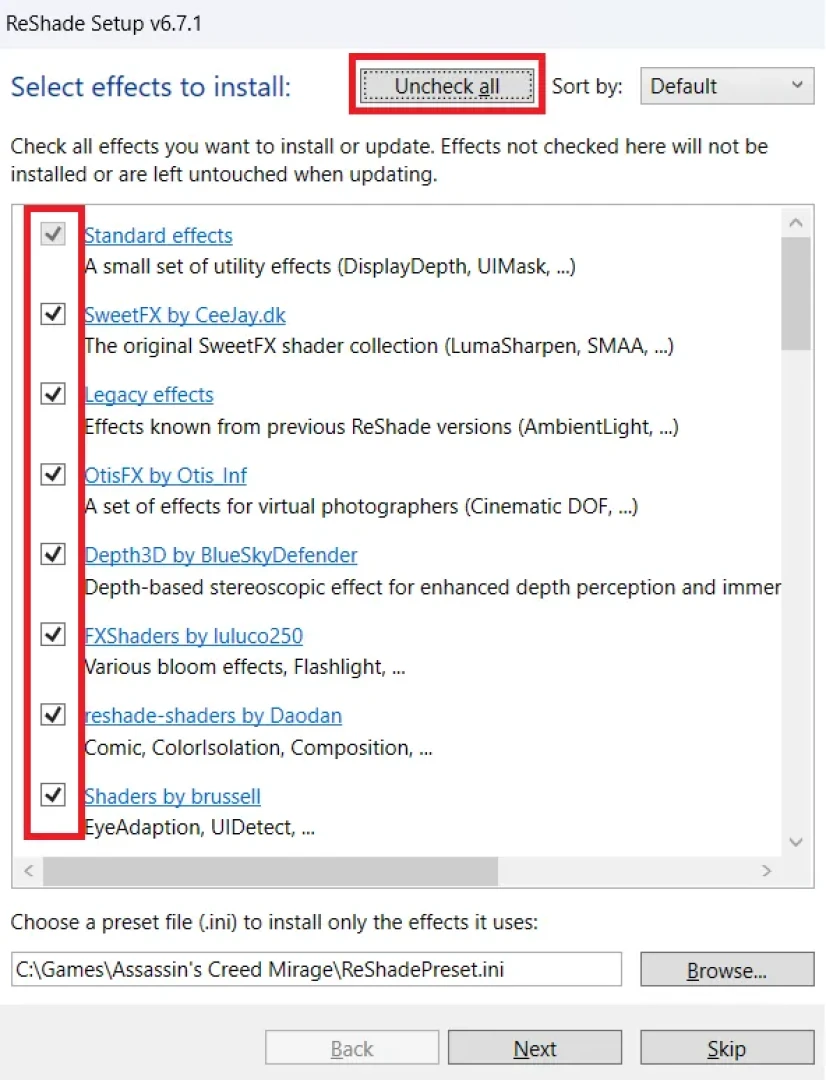
RESHADE INSTALLDownload the latest ADDON version of ReShade from here: "https://reshade.me". If the game crashes or experiencing bugs, try other versions. DLSS5 works only with 6.8.0 or newer version.
Install ALL the shaders by clicking twice on the "Check/Uncheck all" button. Next.
Do NOT install any add-ons, finish the installation.
Copy the 3 files except pictures and dlss5 folder into your main game folder where your game exe is.
Launch the game and press "Home" to bring up the Reshade interface, you can Skip Tutorial. If you get compile errors just ignore them, or you can delete those shaders from the "reshade-shaders/Shaders" folder manually.
Choose the reshade preset in the upper bar on the interface then press "Select".
You can turn on/off each effect if you find it disturbing by binding a hotkey to them. Right click on the effect and set a key.
I recommend binding a toggle key to quickly turn on/off the whole preset. You can set this in the Settings tab. (PageUp for me)
You can change the preset effects according to your liking.
MAKE SURE YOU ALWAYS SELECT THE LATEST UPDATED PRESET!
Feel free to ask any question on Patreon, will try my best to answer them ASAP.
REMOVE FOG + NO HUD/EFFECTSIf you copied the shadertoggler file it automatically disables fog and cutscene DOF.
To disable the HUD and other in-game effects press the "End" hotkey. I set almost all the effects to one hotkey.
DLSS 5 mod + bridge installNOTE: I use the newest version with more complex interface and stronger effect. I included all the necessary files in my modpack. This is how the correct file looks (2679 KB):
DLSS 5 was supported for 4000 and 5000 series nvidia gpus but 2/3000 series recently got a support patch too. Also AMD cards are supported now.
Use this compatibility file for 2/3/4000 series: https://discord.com/channels/1408098019194310818/1543976771920330884/1543982045133275307
Or use Optiscaler: https://github.com/janblade/OptiScaler-DLSSNR-PreSR-Multipass/releases/download/v0.1.13-dlssnr-vit-reuse/OptiScaler-DLSSNR-F5-v0.1.13-dlssnr-vit-reuse.zip
The dlss5 version Im using uses the reshade interface, so reshade add-ons version is necessary, make sure you have installed it properly.
You can find RenoDX on github: https://github.com/clshortfuse/renodx
You can joint their discord server to find updates or other versions, AIO installers and support for older graphics cards and for non-dlss games also.
DLSS5 Manual install: open the "dlss5 files" folder from my unzipped modpack and copy everything into the same folder where your game .exe is. If you use 2/3/4000 RTX cards you have to use the other patched nvngx_dlssnr.dll file from the links above.
Congrats, you have succesfully installed the DLSS 5 RenoDX mod.
Launch the game, load a save and press "Home" to bring up the reshade interface.
Go to the "RenoDX DLSS" tab and here you can configure the DLSS 5 settings.
Set Hook Method to Present since the game doesnt support DLSS or ray reconstruction. You will experience flickering because of this. I use DLSS bridge to reduce the flickering.
I prefer playing with Model C with Auto encoding
The settings are pretty much the same for both Models, Auto encoding is the best choice. BT.709 has darker visuals if you prefer that.
Set Pass Count to 2 for a more realistic look, be careful this is very performance heavy.
Expect big performance drop so consider using external frame generation software like Lossless Scaling or Optiscaler.
If the performance drop is too much, use 1x Pass Count or try other DLSS5 performance mod.
Click the DLSS5 Bridge tab on your reshade interface and set according to my picture. This mod basically acts like a dlss/ray reconstruction type optical flow. It makes the screen less flickering but reduces fps a bit.
Feel free to ask any question on Patreon, will try my best to answer them ASAP.
Hi everyone
My favorite AC game is finally ready for DLSS5. I spent many hours modding to get the best results on this masterpiece. I combined many mods, but the main visual elements are DLSS5, reshade preset, DLSS bridge and removing the ugly fog. I will break down every step below.
I only made one preset for DLSS5 Model C and this time without ray tracing, because 2x pass dlss5 is already quite drastical visual change, meanwhile ray tracing shaders have minimal visual impact for the performance hit. Maybe next time.
Update 2.0 changes:
New reshade preset for DLSS5 Cinematic (Model C)
DLSS bridge to reduce flickering
New modlist
Enjoy and thank you for your support guys! Love you all!
MODLISTI'm playing with the Ubisoft version of the game, so the version is 1.5.0. Steam uses 1.5.1 version. Make sure you download the correct mod version for your game.
The two most important mods that are requirements for others:
ACUFixes and Plugin Loader: https://www.nexusmods.com/assassinscreedunity/mods/131
ACUFixes and Plugin Loader (1.5.1): https://www.nexusmods.com/assassinscreedunity/mods/481
Asset Overrides: https://www.nexusmods.com/assassinscreedunity/mods/366
Asset Overrides (1.5.1): https://www.nexusmods.com/assassinscreedunity/mods/482
Other mods:
New 90fps cloth patch: https://www.nexusmods.com/assassinscreedunity/mods/360
Arni Fearless Outfit Figurine Inspired: https://www.nexusmods.com/assassinscreedunity/mods/409
Alternate Walking animation: https://www.nexusmods.com/assassinscreedunity/mods/280
Arno's Trailer Outfit As Legacy Outfit (version1): https://www.nexusmods.com/assassinscreedunity/mods/373
Arno Trailer Near Accurate (version2): https://www.nexusmods.com/assassinscreedunity/mods/417
Better LOD and Texture Pop-in-Fix: https://www.nexusmods.com/assassinscreedunity/mods/401
Less Frequent World Events (Paris): https://www.nexusmods.com/assassinscreedunity/mods/299
No-HUD-No-Effects (included in my modpack): https://www.nexusmods.com/assassinscreedunity/mods/396
No-Intro: https://www.nexusmods.com/assassinscreedunity/mods/128
Parkour Front flip and Jump mod: https://www.nexusmods.com/assassinscreedunity/mods/222
Templar Extremist Retexture: https://www.nexusmods.com/assassinscreedunity/mods/133
RESHADE INSTALLDownload the latest ADDON version of ReShade from here: "https://reshade.me". If the game crashes or experiencing bugs, try other versions. DLSS5 works only with 6.8.0 or newer version.
Install ALL the shaders by clicking twice on the "Check/Uncheck all" button. Next.
Do NOT install any add-ons, finish the installation.
Copy the 3 files except pictures and dlss5 folder into your main game folder where your game exe is.
Launch the game and press "Home" to bring up the Reshade interface, you can Skip Tutorial. If you get compile errors just ignore them, or you can delete those shaders from the "reshade-shaders/Shaders" folder manually.
Choose the reshade preset in the upper bar on the interface then press "Select".
You can turn on/off each effect if you find it disturbing by binding a hotkey to them. Right click on the effect and set a key.
I recommend binding a toggle key to quickly turn on/off the whole preset. You can set this in the Settings tab. (PageUp for me)
You can change the preset effects according to your liking.
MAKE SURE YOU ALWAYS SELECT THE LATEST UPDATED PRESET!
Feel free to ask any question on Patreon, will try my best to answer them ASAP.
REMOVE FOG + NO HUD/EFFECTSIf you copied the shadertoggler file it automatically disables fog and cutscene DOF.
To disable the HUD and other in-game effects press the "End" hotkey. I set almost all the effects to one hotkey.
DLSS 5 mod + bridge installNOTE: I use the newest version with more complex interface and stronger effect. I included all the necessary files in my modpack. This is how the correct file looks (2679 KB):
DLSS 5 was supported for 4000 and 5000 series nvidia gpus but 2/3000 series recently got a support patch too. Also AMD cards are supported now.
Use this compatibility file for 2/3/4000 series: https://discord.com/channels/1408098019194310818/1543976771920330884/1543982045133275307
Or use Optiscaler: https://github.com/janblade/OptiScaler-DLSSNR-PreSR-Multipass/releases/download/v0.1.13-dlssnr-vit-reuse/OptiScaler-DLSSNR-F5-v0.1.13-dlssnr-vit-reuse.zip
The dlss5 version Im using uses the reshade interface, so reshade add-ons version is necessary, make sure you have installed it properly.
You can find RenoDX on github: https://github.com/clshortfuse/renodx
You can joint their discord server to find updates or other versions, AIO installers and support for older graphics cards and for non-dlss games also.
DLSS5 Manual install: open the "dlss5 files" folder from my unzipped modpack and copy everything into the same folder where your game .exe is. If you use 2/3/4000 RTX cards you have to use the other patched nvngx_dlssnr.dll file from the links above.
Congrats, you have succesfully installed the DLSS 5 RenoDX mod.
Launch the game, load a save and press "Home" to bring up the reshade interface.
Go to the "RenoDX DLSS" tab and here you can configure the DLSS 5 settings.
Set Hook Method to Present since the game doesnt support DLSS or ray reconstruction. You will experience flickering because of this. I use DLSS bridge to reduce the flickering.
I prefer playing with Model C with Auto encoding
The settings are pretty much the same for both Models, Auto encoding is the best choice. BT.709 has darker visuals if you prefer that.
Set Pass Count to 2 for a more realistic look, be careful this is very performance heavy.
Expect big performance drop so consider using external frame generation software like Lossless Scaling or Optiscaler.
If the performance drop is too much, use 1x Pass Count or try other DLSS5 performance mod.
Click the DLSS5 Bridge tab on your reshade interface and set according to my picture. This mod basically acts like a dlss/ray reconstruction type optical flow. It makes the screen less flickering but reduces fps a bit.
Feel free to ask any question on Patreon, will try my best to answer them ASAP.

Comments (0)