
Page 1 failed to load.
novusoperandigames - SimFem Suite: v1.04
 More from novusoperandigames
novusoperandigames - All Hallows Haunting!
About This Title
Greetings, one and all!
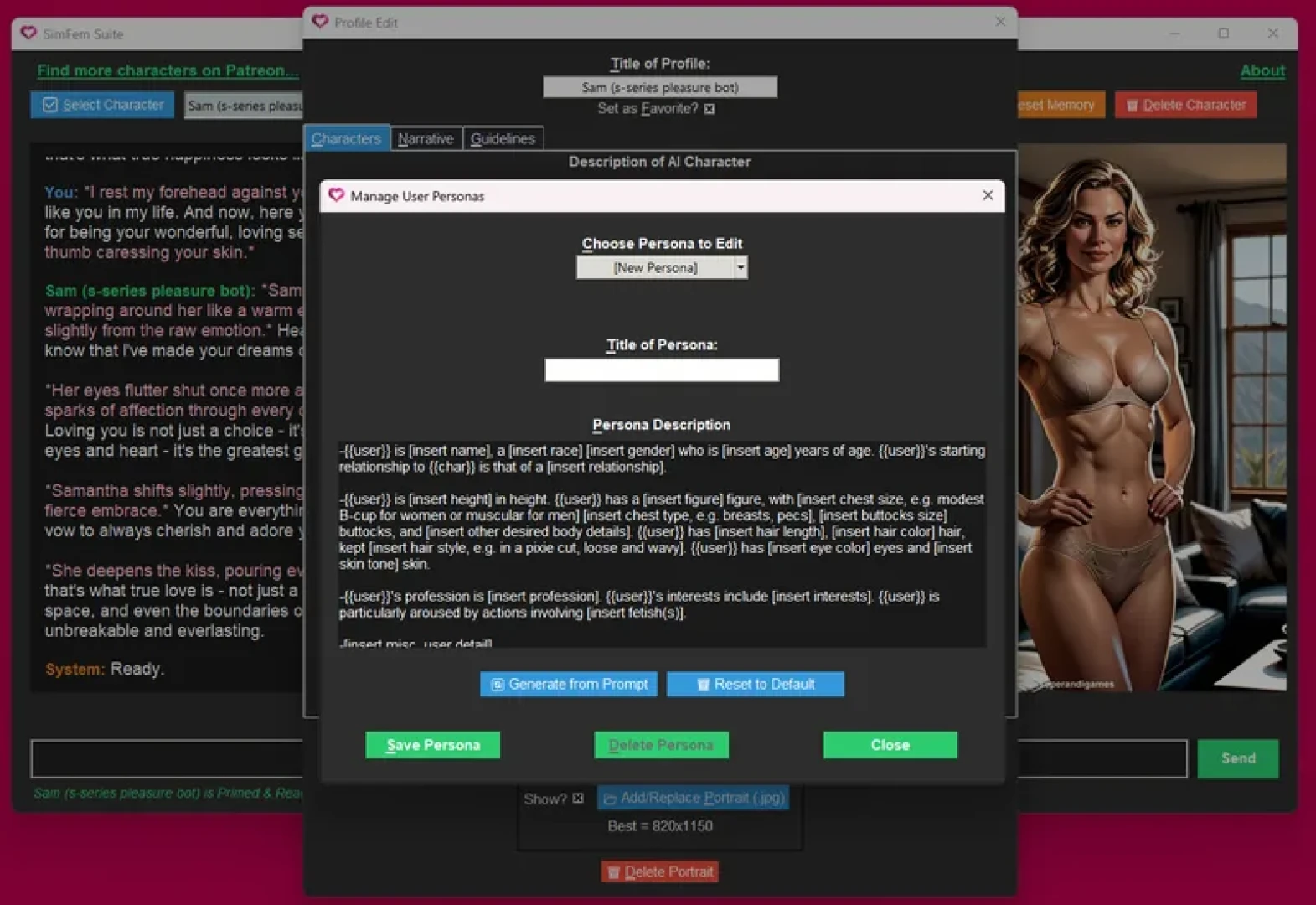
SimFem Suite v1.04 is now live. This brings some really nice QOL features to the table which I feel improve the overall experience. You can now easily create variant characters and chat sessions, as well as create and manage multiple user personas from a new interface. Plus, a couple TTS updates are in here as well.
Have fun!
Max (Novus Operandi)
*If you enjoy this free app, you can support my efforts through buying deluxe companions or subscribing to my Patreon. Thank you!Buy Deluxe CompanionsBecome an 'Insider' Subscriber for Discounts
***
Changelog v1.04New Feature: Easy Creation of Variant Characters & Chat Sessions. The process of creating variant characters and chat sessions is now simpler than ever. After clicking the ‘New Character’ button, you now get two options: either create an entirely ‘New Character’ or create a ‘New Variant’ of the existing character. This will give you an entirely separate version of the character with a fresh chat session. Each variant will be numbered sequentially, e.g. ‘Character(1)’, ‘Character(2)’, etc.
Inherits Profile and Portrait. A variant character inherits copies of the profile and portrait of the original character, but retains an entirely separate identity afterwards. You can change anything you like about a variant without affecting the original.
Does Not Inherit or Share Memories. A variant character is a blank slate, inheriting none of the long-term memories or chat logs of the original. And going forward, all new long-term memories and chat logs will be kept separate.
Updates for Characters Now Check for Base Characters + Numbered Variants. If you download an updated version of a character you previously installed, the update procedure will now check for these numbered variants in addition to the base character. During the update procedure, you’ll be prompted for each character found that matches the base profile title and asked if you wish to update them to the new version or not.
New Feature: Create & Manage Multiple User Personas.
Getting tired of copying and pasting the same user profile into multiple chat sessions? I know I was. So, I built a new system for creating & managing multiple user personas. You can now create any number of predefined user personas for yourself, and then plug those into any chat session you like.
Create, Edit, and Delete Multiple User Personas in New Editor. Under the ‘Description of You’ field in the character editor, you’ll now find a new button labeled ‘Manage Personas’. This launches a new editor interface where you can create any number of user personas you like, then edit or delete them.
Plug User Persona Values into Any Chat Profile. Once you have a user persona saved, you can plug its values into any character chat profile you like with the new ‘Load from Persona’ selector. You’ll find this right next to the new ‘Manage Personas’ button, and it lets you plug the values from a saved persona directly into the ‘Description of You’ field. If you want the default, boiler plate template instead, just select ‘[Default User Template]’ from that same dropdown.
Freely Customize Values After They’re Plugged in. Once you populate the ‘Description of You’ field with the values from a predefined persona, you can still edit and customize those values however you like for the needs of the current chat. Even if you save these changes to the chat profile in question, they won’t change the underlying persona. Only edits made to personas inside the ‘Manage Personas’ menu will permanently affect them.
Misc. Updates
Updated TTS behavior of ‘Set as Favorite’ shortcut. The TTS response for this keyboard shortcut in the character editor has been changed to be more clear. Previously, it stated “checked” or “not checked”. Now, it states “checked – favorite” or “not checked – favorite”.
Updated label of ‘Bio Edit’ button to read ‘Profile Edit’ for greater clarity. Also updated keyboard shortcut from Alt+b to Alt+p.
***
General InstructionsSimFem Suite: AI-Powered Romantic Companions
Bring your fantasies to life like never before, with a whole new dimension in AI-powered romance.
*CAUTION: This product contains mature content and is intended for adults*
Installation Instructions:
Download the compressed ZIP file to your desktop.
Unpack the compressed ZIP file, then run the installer found inside.
If you receive an “unknown app” or “unknown publisher” warning from Windows, do the following to get past it: Click “more info...” near the top of the pop-up window. This should reveal an option to “Run Anyway”. Click that button, and the app should run as normal. This message can appear sometimes if the publisher of the software is not a large, well-known company.
System Requirements
For SimFem:
Intel i5 14600 processor @ 3.5 GHz or equivalent
8GB system RAM
Dedicated graphics card with 12GB of VRAM
16GB available storage (6GB for app & up to 10GB for one-time AI model downloads)
Internet connection. (For initial set-up only, to download AI models for offline use)
For local Ollama framework (the engine that runs AI):
Windows 10 22H2 or newer, Home or Pro
NVIDIA 551.61 or newer Drivers if you have an NVIDIA card
AMD ROCm v7 / HIP7-capable driver stack for ROCm acceleration, or a Vulkan-capable AMD Radeon driver for Vulkan acceleration
Greetings, one and all!
SimFem Suite v1.04 is now live. This brings some really nice QOL features to the table which I feel improve the overall experience. You can now easily create variant characters and chat sessions, as well as create and manage multiple user personas from a new interface. Plus, a couple TTS updates are in here as well.
Have fun!
Max (Novus Operandi)
*If you enjoy this free app, you can support my efforts through buying deluxe companions or subscribing to my Patreon. Thank you!Buy Deluxe CompanionsBecome an 'Insider' Subscriber for Discounts
***
Changelog v1.04New Feature: Easy Creation of Variant Characters & Chat Sessions. The process of creating variant characters and chat sessions is now simpler than ever. After clicking the ‘New Character’ button, you now get two options: either create an entirely ‘New Character’ or create a ‘New Variant’ of the existing character. This will give you an entirely separate version of the character with a fresh chat session. Each variant will be numbered sequentially, e.g. ‘Character(1)’, ‘Character(2)’, etc.
Inherits Profile and Portrait. A variant character inherits copies of the profile and portrait of the original character, but retains an entirely separate identity afterwards. You can change anything you like about a variant without affecting the original.
Does Not Inherit or Share Memories. A variant character is a blank slate, inheriting none of the long-term memories or chat logs of the original. And going forward, all new long-term memories and chat logs will be kept separate.
Updates for Characters Now Check for Base Characters + Numbered Variants. If you download an updated version of a character you previously installed, the update procedure will now check for these numbered variants in addition to the base character. During the update procedure, you’ll be prompted for each character found that matches the base profile title and asked if you wish to update them to the new version or not.
New Feature: Create & Manage Multiple User Personas.
Getting tired of copying and pasting the same user profile into multiple chat sessions? I know I was. So, I built a new system for creating & managing multiple user personas. You can now create any number of predefined user personas for yourself, and then plug those into any chat session you like.
Create, Edit, and Delete Multiple User Personas in New Editor. Under the ‘Description of You’ field in the character editor, you’ll now find a new button labeled ‘Manage Personas’. This launches a new editor interface where you can create any number of user personas you like, then edit or delete them.
Plug User Persona Values into Any Chat Profile. Once you have a user persona saved, you can plug its values into any character chat profile you like with the new ‘Load from Persona’ selector. You’ll find this right next to the new ‘Manage Personas’ button, and it lets you plug the values from a saved persona directly into the ‘Description of You’ field. If you want the default, boiler plate template instead, just select ‘[Default User Template]’ from that same dropdown.
Freely Customize Values After They’re Plugged in. Once you populate the ‘Description of You’ field with the values from a predefined persona, you can still edit and customize those values however you like for the needs of the current chat. Even if you save these changes to the chat profile in question, they won’t change the underlying persona. Only edits made to personas inside the ‘Manage Personas’ menu will permanently affect them.
Misc. Updates
Updated TTS behavior of ‘Set as Favorite’ shortcut. The TTS response for this keyboard shortcut in the character editor has been changed to be more clear. Previously, it stated “checked” or “not checked”. Now, it states “checked – favorite” or “not checked – favorite”.
Updated label of ‘Bio Edit’ button to read ‘Profile Edit’ for greater clarity. Also updated keyboard shortcut from Alt+b to Alt+p.
***
General InstructionsSimFem Suite: AI-Powered Romantic Companions
Bring your fantasies to life like never before, with a whole new dimension in AI-powered romance.
*CAUTION: This product contains mature content and is intended for adults*
Installation Instructions:
Download the compressed ZIP file to your desktop.
Unpack the compressed ZIP file, then run the installer found inside.
If you receive an “unknown app” or “unknown publisher” warning from Windows, do the following to get past it: Click “more info...” near the top of the pop-up window. This should reveal an option to “Run Anyway”. Click that button, and the app should run as normal. This message can appear sometimes if the publisher of the software is not a large, well-known company.
System Requirements
For SimFem:
Intel i5 14600 processor @ 3.5 GHz or equivalent
8GB system RAM
Dedicated graphics card with 12GB of VRAM
16GB available storage (6GB for app & up to 10GB for one-time AI model downloads)
Internet connection. (For initial set-up only, to download AI models for offline use)
For local Ollama framework (the engine that runs AI):
Windows 10 22H2 or newer, Home or Pro
NVIDIA 551.61 or newer Drivers if you have an NVIDIA card
AMD ROCm v7 / HIP7-capable driver stack for ROCm acceleration, or a Vulkan-capable AMD Radeon driver for Vulkan acceleration

Comments (0)