
Page 1 failed to load.
MichaelGhelfi - MGS Audio desktop 1.5: soundboards, your phone as a remote, Stream Deck and Hue lights
 More from MichaelGhelfi
MichaelGhelfi - Halloween collab! Monsters, a song, map and a new portal app! part 2
About This Title
We are one step closer to my dark evil plan * Sardonic laugh *.
This is the biggest update the desktop app has had. Until now it played your music and ambiences. With 1.5 it can run the whole sound of your table ... and the lights in the room too.
If you already have the app, it will offer the update the next time you open it. It's the same on Windows, macOS and Linux.
Soundboards
A soundboard is a grid of pads you fire by hand, on top of whatever is playing. The music and ambiences keep going underneath. Click a pad, or press the keys 1 to 9 and 0. Press it again and it starts over. "Stop pads" silences them all at once.
113 soundboards come ready-made, in 18 families:
One for each D&D spellcasting class, with its spells (the longest spell lists get one board per school)
The fighter, the barbarian, the rogue and the monk, with their attacks
Weapons, damage types, monsters, the dungeon, magic, the table, nature, modern and science fiction
To make your own, click New soundboard in the Boards tab and drop sounds onto it. You can also add a ready-made one to your playlists and change it from there.
Every pad can hold several takes of its sound, up to 16. It plays a different one each time and never the one you just heard, so the tenth sword hit doesn't sound like the first. A numbered series (Sword Hit 1, 2, 3…) goes in with one click!
Sounds that come back
An ambience mix used to start its ambiences and leave them running. Now you can put a sound effect in a mix and tell it how often to come back: thunder every 20 to 60 seconds, a distant bell every 5 to 10 minutes, a creaking door now and then. Pick a rhythm in the Every column, or type your own: exactly 22 seconds, or anywhere between 30 seconds and 2:45. Each time it comes back, it's a different take.
A mix can now hold up to 12 ambiences at once, up from 8.
57 ready-made places
We've prepared 57 mixes for you, from a crowded tavern to a crypt, a storm at sea, a forge and a starship's bridge, with steampunk and post-apocalyptic places along the way. Each one has its ambience, a few sounds that come back and its light. Play them as they are, or click "Add to my playlists" to make one yours and change its sounds, its rhythms and its lights.
Your phone as a remote control
Click the remote control button at the top of the window, turn it on and scan the QR code with your phone. Your phone needs to be on the same Wi-Fi as the computer. Your playlists, mixes and pads are now in your hand, so you can run the sound from your seat without turning to the screen. Press a mix to start it and press it again to stop it. The phone always shows what's playing.
Your players can join too. In the Players tab of the same panel there's a second code, just for them. They only see the soundboards you share with them (tick "Players can use these pads" in a soundboard's Edit). Their pads play at a volume you choose, and you set how long each phone has to wait between two pads, so nobody turns the session into a drum solo or spams fart sounds. On their phone, they can star their favourite pads.
Stream Deck
If you have a Stream Deck, the plugin comes with the app. Click "Install the Stream Deck plugin" in the remote control panel. You can then give a key a playlist or a mix (it stays lit while it plays), a pad, or pause, stop all, stop pads, next and previous.
I don't own a Stream Deck and none of my friends do. Please tell me if you find a bug.
Philips Hue lights
My favourite addition by far.
If you have Philips Hue lamps, click the Lights button at the top of the window, find your bridge and press its link button to pair it. Then:
Each mix sets the room's light when it starts. Pick from 36 colours and whites, or a colour of your own, plus the lamps' own effects like fire and candle.
Sounds can light up the room: lightning, a pulse of colour, darkness, a breath, a blink, an alarm. The thunder in a storm mix brings its lightning, at the moment you hear it.
With an entertainment area (you make one in the Hue app), the live lights sweep effects across the room lamp by lamp: a torch passing by, an explosion, a wave of magic, a power failure, a heartbeat. The brightness can also follow the sound!
Any lamp can stay a table light, steady and warm, so everyone can still read their character sheet.
The ready-made mixes already come with their lights.
Finding your way around
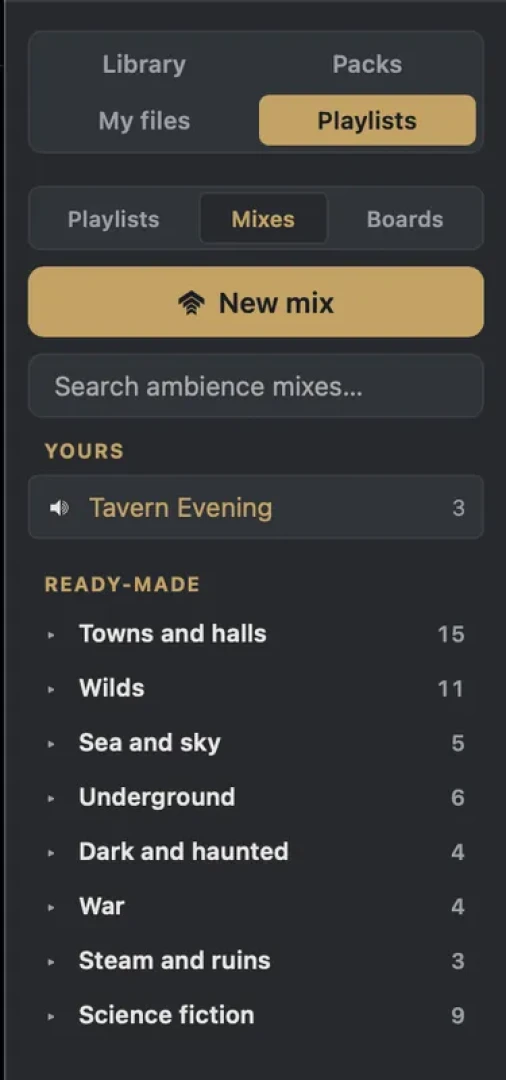
The first time you open 1.5, a guided tour walks you through the app, step by step. The compass at the top of the window replays it whenever you like. The playlists sidebar now has a tab for each kind (Playlists, Mixes, Boards), and a double-click on any of them plays it at once.
Who gets what
Soundboards, sounds that come back, mixes, the phone remote, the players' soundpads, the Stream Deck plugin and the Hue lights are all for paid Patreon tiers, including the lowest. The app itself, your library on your drive, offline play and the guided tour stay open to everyone.
As usual, please tell me if you think of any cool feature we should add. In a few days, I'll write a post about these books I wrote many years ago and mentioned back in June ;)
Have fun!
Michael
We are one step closer to my dark evil plan * Sardonic laugh *.
This is the biggest update the desktop app has had. Until now it played your music and ambiences. With 1.5 it can run the whole sound of your table ... and the lights in the room too.
If you already have the app, it will offer the update the next time you open it. It's the same on Windows, macOS and Linux.
Soundboards
A soundboard is a grid of pads you fire by hand, on top of whatever is playing. The music and ambiences keep going underneath. Click a pad, or press the keys 1 to 9 and 0. Press it again and it starts over. "Stop pads" silences them all at once.
113 soundboards come ready-made, in 18 families:
One for each D&D spellcasting class, with its spells (the longest spell lists get one board per school)
The fighter, the barbarian, the rogue and the monk, with their attacks
Weapons, damage types, monsters, the dungeon, magic, the table, nature, modern and science fiction
To make your own, click New soundboard in the Boards tab and drop sounds onto it. You can also add a ready-made one to your playlists and change it from there.
Every pad can hold several takes of its sound, up to 16. It plays a different one each time and never the one you just heard, so the tenth sword hit doesn't sound like the first. A numbered series (Sword Hit 1, 2, 3…) goes in with one click!
Sounds that come back
An ambience mix used to start its ambiences and leave them running. Now you can put a sound effect in a mix and tell it how often to come back: thunder every 20 to 60 seconds, a distant bell every 5 to 10 minutes, a creaking door now and then. Pick a rhythm in the Every column, or type your own: exactly 22 seconds, or anywhere between 30 seconds and 2:45. Each time it comes back, it's a different take.
A mix can now hold up to 12 ambiences at once, up from 8.
57 ready-made places
We've prepared 57 mixes for you, from a crowded tavern to a crypt, a storm at sea, a forge and a starship's bridge, with steampunk and post-apocalyptic places along the way. Each one has its ambience, a few sounds that come back and its light. Play them as they are, or click "Add to my playlists" to make one yours and change its sounds, its rhythms and its lights.
Your phone as a remote control
Click the remote control button at the top of the window, turn it on and scan the QR code with your phone. Your phone needs to be on the same Wi-Fi as the computer. Your playlists, mixes and pads are now in your hand, so you can run the sound from your seat without turning to the screen. Press a mix to start it and press it again to stop it. The phone always shows what's playing.
Your players can join too. In the Players tab of the same panel there's a second code, just for them. They only see the soundboards you share with them (tick "Players can use these pads" in a soundboard's Edit). Their pads play at a volume you choose, and you set how long each phone has to wait between two pads, so nobody turns the session into a drum solo or spams fart sounds. On their phone, they can star their favourite pads.
Stream Deck
If you have a Stream Deck, the plugin comes with the app. Click "Install the Stream Deck plugin" in the remote control panel. You can then give a key a playlist or a mix (it stays lit while it plays), a pad, or pause, stop all, stop pads, next and previous.
I don't own a Stream Deck and none of my friends do. Please tell me if you find a bug.
Philips Hue lights
My favourite addition by far.
If you have Philips Hue lamps, click the Lights button at the top of the window, find your bridge and press its link button to pair it. Then:
Each mix sets the room's light when it starts. Pick from 36 colours and whites, or a colour of your own, plus the lamps' own effects like fire and candle.
Sounds can light up the room: lightning, a pulse of colour, darkness, a breath, a blink, an alarm. The thunder in a storm mix brings its lightning, at the moment you hear it.
With an entertainment area (you make one in the Hue app), the live lights sweep effects across the room lamp by lamp: a torch passing by, an explosion, a wave of magic, a power failure, a heartbeat. The brightness can also follow the sound!
Any lamp can stay a table light, steady and warm, so everyone can still read their character sheet.
The ready-made mixes already come with their lights.
Finding your way around
The first time you open 1.5, a guided tour walks you through the app, step by step. The compass at the top of the window replays it whenever you like. The playlists sidebar now has a tab for each kind (Playlists, Mixes, Boards), and a double-click on any of them plays it at once.
Who gets what
Soundboards, sounds that come back, mixes, the phone remote, the players' soundpads, the Stream Deck plugin and the Hue lights are all for paid Patreon tiers, including the lowest. The app itself, your library on your drive, offline play and the guided tour stay open to everyone.
As usual, please tell me if you think of any cool feature we should add. In a few days, I'll write a post about these books I wrote many years ago and mentioned back in June ;)
Have fun!
Michael

Comments (0)