
Page 1 failed to load.
NEKESEME - discordサーバーサインイン方法についてのご案内
 More from NEKESEME
NEKESEME - 目隠しリラクゼーション:仮(動画)
About This Title
Discordサーバーへの参加方法
いつもご支援ありがとうございます。
運用中のDiscordサーバーについて、入れない方がいらっしゃるようですので、
アクセス方法を改めて共有します。
多くの場合、調べた感じだとPatreonとDiscordのアカウント連携が完了していないことが原因のようです。
まだ連携されていない方は、以下の手順をお試しください。
Discordサーバーは、以下のプランの会員様専用です。
■ Discordアクセス権があるプラン
・スタンダードプラン
・月プラン[Moon Plan]
・太陽プラン[Sun Plan]
※ライトプラン、星プラン[Star Plan]にはDiscordアクセス権は含まれません。
Discordをご希望の方は、月プランまたは太陽プランへのご加入/プラン変更をお願いします。
個別の招待リンクは発行されません。
PatreonとDiscordのアカウント連携で、自動で参加できる仕組みです。
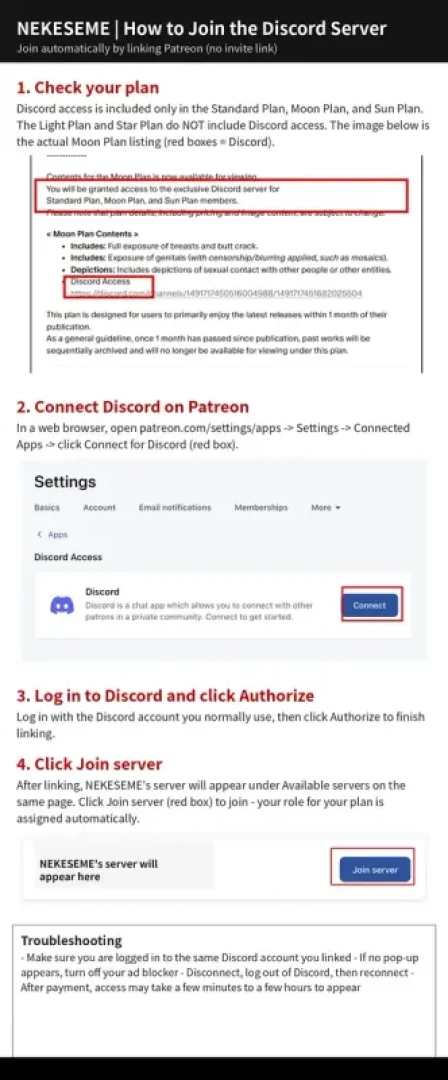
添付の画像ガイドとあわせてご覧ください。
■ 参加手順
1. WebブラウザでPatreonにログインしてください
https://www.patreon.com/c/NEKESEME
※Patreonアプリでは連携できない場合があるため、PC/ブラウザ版を推奨します
2. 設定 → 接続中のアプリ(Connected Apps)を開いてください
直接開く場合:https://www.patreon.com/settings/apps
3. Discordの「接続する(Connect)」を押してください
4. Discordにログインし、「認証(Authorize)」を押してください
※普段お使いのDiscordアカウントでログインしてください
5. 連携後、同じページに表示される「サーバーに参加(Join server)」を押してください
加入プランに応じたロールが自動で付与され、限定チャンネルが見られるようになります
■ うまくいかないとき
・連携したDiscordアカウントと、現在ログイン中のアカウントが同じかご確認ください
・ポップアップが出ない場合は、広告ブロッカーをOFFにしてください
・表示されない場合は、連携を一度解除 → Discordからログアウト → 再接続してください
・決済完了直後は、反映まで数分〜数時間かかる場合があります
■ 退会・プラン変更について
対象外プランへの変更や退会をすると、ロールは自動で外れ、サーバーは見られなくなります。
Patreon公式ヘルプ:
https://support.patreon.com/hc/en-us/articles/212052266-Getting-Discord-access
[Announcement] How to Join the Discord Server
Thank you for your support.
It seems some of you are having trouble joining the Discord server I run, so
I am sharing the access instructions again.
From what I have checked, it seems that in most cases this happens because your Patreon and Discord accounts have not been linked yet.
If you have not linked them yet, please follow the steps below.
The Discord server is available to members of the following plans only:
■ Plans with Discord access
- Standard Plan
- Moon Plan
- Sun Plan
* The Light Plan and Star Plan do NOT include Discord access.
If you would like to join the Discord server, please join or upgrade to the Moon Plan or Sun Plan.
No individual invite link will be issued.
You join automatically by linking your Patreon and Discord accounts.
Please also see the attached image guide.
■ How to join
1. Log in to Patreon in a web browser
https://www.patreon.com/c/NEKESEME
* Linking may not work in the Patreon app, so a PC or web browser is recommended
2. Go to Settings -> Connected Apps
Direct link: https://www.patreon.com/settings/apps
3. Click "Connect" for Discord
4. Log in to Discord and click "Authorize"
* Please log in with the Discord account you normally use
5. After linking, click "Join server" on the same page
Your role for your plan will be assigned automatically, and the members-only channels will become visible
■ Troubleshooting
- Make sure you are logged in to the same Discord account you linked
- If no pop-up appears, turn off your ad blocker
- If the server does not appear, disconnect the link, log out of Discord, then reconnect
- After payment, access may take a few minutes to a few hours to appear
■ Leaving / changing plans
If you cancel or change to a plan without Discord access, your role will be removed automatically and the server will no longer be visible.
Patreon Help Center:
https://support.patreon.com/hc/en-us/articles/212052266-Getting-Discord-access
Discordサーバーへの参加方法
いつもご支援ありがとうございます。
運用中のDiscordサーバーについて、入れない方がいらっしゃるようですので、
アクセス方法を改めて共有します。
多くの場合、調べた感じだとPatreonとDiscordのアカウント連携が完了していないことが原因のようです。
まだ連携されていない方は、以下の手順をお試しください。
Discordサーバーは、以下のプランの会員様専用です。
■ Discordアクセス権があるプラン
・スタンダードプラン
・月プラン[Moon Plan]
・太陽プラン[Sun Plan]
※ライトプラン、星プラン[Star Plan]にはDiscordアクセス権は含まれません。
Discordをご希望の方は、月プランまたは太陽プランへのご加入/プラン変更をお願いします。
個別の招待リンクは発行されません。
PatreonとDiscordのアカウント連携で、自動で参加できる仕組みです。
添付の画像ガイドとあわせてご覧ください。
■ 参加手順
1. WebブラウザでPatreonにログインしてください
https://www.patreon.com/c/NEKESEME
※Patreonアプリでは連携できない場合があるため、PC/ブラウザ版を推奨します
2. 設定 → 接続中のアプリ(Connected Apps)を開いてください
直接開く場合:https://www.patreon.com/settings/apps
3. Discordの「接続する(Connect)」を押してください
4. Discordにログインし、「認証(Authorize)」を押してください
※普段お使いのDiscordアカウントでログインしてください
5. 連携後、同じページに表示される「サーバーに参加(Join server)」を押してください
加入プランに応じたロールが自動で付与され、限定チャンネルが見られるようになります
■ うまくいかないとき
・連携したDiscordアカウントと、現在ログイン中のアカウントが同じかご確認ください
・ポップアップが出ない場合は、広告ブロッカーをOFFにしてください
・表示されない場合は、連携を一度解除 → Discordからログアウト → 再接続してください
・決済完了直後は、反映まで数分〜数時間かかる場合があります
■ 退会・プラン変更について
対象外プランへの変更や退会をすると、ロールは自動で外れ、サーバーは見られなくなります。
Patreon公式ヘルプ:
https://support.patreon.com/hc/en-us/articles/212052266-Getting-Discord-access
[Announcement] How to Join the Discord Server
Thank you for your support.
It seems some of you are having trouble joining the Discord server I run, so
I am sharing the access instructions again.
From what I have checked, it seems that in most cases this happens because your Patreon and Discord accounts have not been linked yet.
If you have not linked them yet, please follow the steps below.
The Discord server is available to members of the following plans only:
■ Plans with Discord access
- Standard Plan
- Moon Plan
- Sun Plan
* The Light Plan and Star Plan do NOT include Discord access.
If you would like to join the Discord server, please join or upgrade to the Moon Plan or Sun Plan.
No individual invite link will be issued.
You join automatically by linking your Patreon and Discord accounts.
Please also see the attached image guide.
■ How to join
1. Log in to Patreon in a web browser
https://www.patreon.com/c/NEKESEME
* Linking may not work in the Patreon app, so a PC or web browser is recommended
2. Go to Settings -> Connected Apps
Direct link: https://www.patreon.com/settings/apps
3. Click "Connect" for Discord
4. Log in to Discord and click "Authorize"
* Please log in with the Discord account you normally use
5. After linking, click "Join server" on the same page
Your role for your plan will be assigned automatically, and the members-only channels will become visible
■ Troubleshooting
- Make sure you are logged in to the same Discord account you linked
- If no pop-up appears, turn off your ad blocker
- If the server does not appear, disconnect the link, log out of Discord, then reconnect
- After payment, access may take a few minutes to a few hours to appear
■ Leaving / changing plans
If you cancel or change to a plan without Discord access, your role will be removed automatically and the server will no longer be visible.
Patreon Help Center:
https://support.patreon.com/hc/en-us/articles/212052266-Getting-Discord-access

Comments (0)