2 pictures

It's been a long time! Apologies for the very long hiatus - I was working on tools to improve my mods, but ended up getting stuck in a loop of working on things and never releasing them...I sincerely apologize for my absence, and am very thankful to everyone who continued to support me during this time.
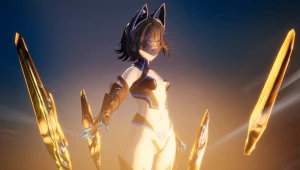
I am slowly starting to return to modding, and to start things off here is a menu mod for the new game Endfield that was just released!
Mod DL: https://mega.nz/file/AbMAARzQ#gcdjK1_uALz164UXOLuf7z-Bj67GSiWHlhdaae_XdqU
Update1: There was an issue while the transparent part of Endmin's skirt was turned off and she was a follower that caused the floor to vanish in some areas. You can either download the updated version, or go to misc -> endf_misc.ini and change 73bbe4ee to 967ca205 to fix.
Update2: Fixed an issue with AMD gpus that was causing some parts to not turn off properly (the transparent cape and accessories on the dress)
The modding tools are still being developed as of the time of writing, but the game is similar enough that I was able to repurpose some of the tools I made for other games to work with Endfield.
IMPORTANT: Since the tools are incomplete, this mod still has several issues that I was unable to fix. See Known Issues at the bottom for details (the largest issue is the arm color mismatch, which I am not able to fix at the moment). Once the tools are officially released, I will return to this mod to polish it
To use this mod as of Jan 31 2026, your best option is to use wakka810's beta loader (located here https://gamebanana.com/tools/21760 ) to load 3dmigoto into the game. In the coming few weeks, the official loader by AGMG will be released and when that happens please use that instead. Once the modding tool is loaded, just unzip the mod into the Mods folder and press F10 in-game to reload.
This is a menu mod - you can open the menu by pressing / while Endmin is on field in order to toggle all the parts. Left click cycles through options, right click disables a part - it is also possible to control the menu using the keyboard, see the README in the mod folder for more details.
The icons on the side let you swap the pages, and each page has independent color control via the color wheel (left click is primary color, right click is secondary color). The help menu is turned on by default, and can be turned off by pressing the ? button - while on, you can hover over buttons to get more details about what they do.
You can reposition the menu by using the corner buttons, as well as swap between displaying parts by theme and by location. There is also a page with presets that you can use to save/load costume combinations.
Known Issues:
The shading/color of the hand is off compared to the rest of the body (and there is a slight gap between the two). This can't be fixed without a merged skeleton, which has not been implemented yet in the modding tools. This also results in some clipping with parts nearby
Glow, Transparency and texture cutouts not currently functional (modding libraries not yet written)
Tan slider and shape keys only partially functional, I ran into difficulties getting them to work fully and will fix in next version
A few parts such as tails and leashes aren't being displayed properly. This will be fixed in the next version
Character scaling not working, I have not yet researched it
Thank you for your support, and I hope you like the mod!

![Hailvuln - [4K] 012 extra: VSK94 (cen)](https://lewdvault.com/storage/images/44319915/118259/1_thumb.webp)