
Fouad Raheb - Regram 6.2
infoAbout This Title
Hello Patrons,Thanks for your continuous support, bug reports, and feature suggestions!
What's new in this update?
Bug fixes and compatibility updates for IG 447.
New in-app notification system. Several notifications can now show at once, stacked, instead of one at a time.
Notifications come in two looks — Banner (full width, default) and Toast (small pill) — set globally or per feature under Settings > Notifications.
New Notification History: every notification Regram showed, filterable by feature, and tapping one opens what the banner would have opened.
New Stories Filtering page under Interface > Stories Tray, with a switch per card IG inserts between stories: Join Trending, Popular, Your Turn, Music, Restyle, Meta AI, Threads and other cards.
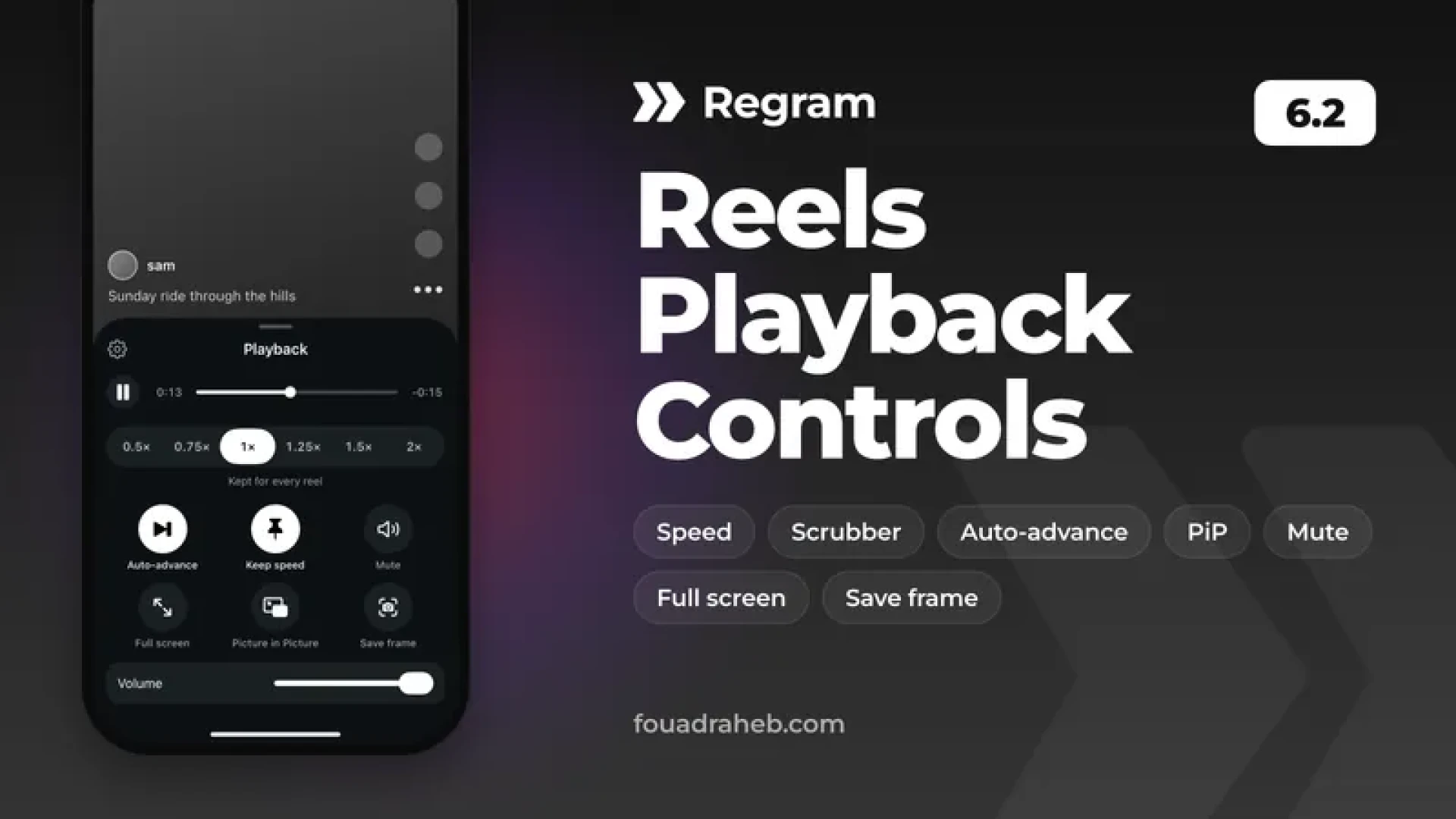
New Reels Playback Controls: open them three ways — long-press the ••• button, a floating button you can drag anywhere on the reel, or the Regram action button — for a sheet with play/pause, a scrubber with elapsed and remaining time, a six-stop speed selector (0.5× to 2×), auto-advance, keep speed, mute, full screen, Picture in Picture, save the current frame, and a reels-only volume. Kept speed applies to every reel and survives relaunch.
Profile > Spoofing is now one page with a live preview, a master switch, and a section per value: followers, following, posts, verified badge, and the new username and display name spoofs. With the master switch off nothing spoofing-related runs at all. The names show everywhere in the app but stay on your device — your real account is untouched, and Edit Profile always shows the real values.
Reels auto-advance now also moves past sponsored reels instead of leaving them looping.
New “Leave Chat After Seen” option under Messages > Send Seen On... — closes the chat and goes back to the inbox after you send seen from the bar button or the + menu.
Open in Regram Safari extension now shows a banner on Instagram pages with an Open button, so links reach Regram on the first page instead of only after tapping the reel or Open in Instagram.
New Ads section: one place for hiding ads, with a Hide All Ads master switch plus per-place switches for Feed, Stories, Explore and Reels. Your existing ad settings carry over, and the old spots under Feed / Reels Filtering and Interface now link to the new section.
Added Crash Logs under App Utilities. Regram now writes a report whenever IG crashes, so you can read it, search it, and share it when reporting a problem.
Device ID: added a required warning screen explaining who the feature is for before masking can be turned on, plus a How It Works page answering the common questions.
Fixed “Fix Pop-ups & Emoji” not staying off. The setting was stored in the App Group container, which is missing on apps signed without App Group support, so the switch turned itself back on.
Fixed the story mark-seen button menu showing the previous account's name and the wrong exclude/include action after moving to the next story.
What's New now has a Previous Versions button — browse the highlights of every Regram release since 5.0.
How to install and update
Sideloading
Download, sign and install this IPA file. (Duplicate IPA file)
If you are signing the app with AltStore using a free Apple ID, you need to use the Plugins-Removed IPA file.
If you're updating from an older version, make sure to use the same signing certificate as your existing installed version so you're able to update without deleting.
Push notifications require signing the app with a distribution certificate (Check this guide on how to receive notifications), (Flekstore is one of the most reliable options for sideloading).
You can also download the apps directly from our Sideloading sources:
https://altstore.fouadraheb.com for AltStore/SideStore
https://source.fouadraheb.com for Flekstore/Feather/ESign/Gbox
Jailbreak (iOS 14 - 17.3.1)
Regram supports iOS 14+, but since IG 411.0 and newer supports only iOS 16.3+, some features on iOS 14/15 are not supported or won't work properly.
Add https://apt.fouadraheb.com to your package manager's sources and download Regram from there.
TrollStore (iOS 14 - 16.6)
Download this IPA file and open in TrollStore app to install or upgrade your existing version.
How to enable Open in Regram Safari Extension
Go to the Settings app > find and select Safari settings
If you see "Default Browser App", change it to make sure Safari is your default browser
Then go to Extensions > Open in Regram > Enable "Allow Extension" and set permissions to "Allow" for all available domains
That's it! Now every time Safari detects an IG URL it will show an Open in Regram alert which opens in Regram.
Help & Support
Join the Regram channel on Discord (discord.gg/8z3zY93).
Use the Contact Support button from inside Regram settings.
You can access Regram settings by long-pressing on Home button from tab bar or from inside IG settings.
As always, feel free to reach out if you have any questions or feedback.
Hello Patrons,Thanks for your continuous support, bug reports, and feature suggestions!
What's new in this update?
Bug fixes and compatibility updates for IG 447.
New in-app notification system. Several notifications can now show at once, stacked, instead of one at a time.
Notifications come in two looks — Banner (full width, default) and Toast (small pill) — set globally or per feature under Settings > Notifications.
New Notification History: every notification Regram showed, filterable by feature, and tapping one opens what the banner would have opened.
New Stories Filtering page under Interface > Stories Tray, with a switch per card IG inserts between stories: Join Trending, Popular, Your Turn, Music, Restyle, Meta AI, Threads and other cards.
New Reels Playback Controls: open them three ways — long-press the ••• button, a floating button you can drag anywhere on the reel, or the Regram action button — for a sheet with play/pause, a scrubber with elapsed and remaining time, a six-stop speed selector (0.5× to 2×), auto-advance, keep speed, mute, full screen, Picture in Picture, save the current frame, and a reels-only volume. Kept speed applies to every reel and survives relaunch.
Profile > Spoofing is now one page with a live preview, a master switch, and a section per value: followers, following, posts, verified badge, and the new username and display name spoofs. With the master switch off nothing spoofing-related runs at all. The names show everywhere in the app but stay on your device — your real account is untouched, and Edit Profile always shows the real values.
Reels auto-advance now also moves past sponsored reels instead of leaving them looping.
New “Leave Chat After Seen” option under Messages > Send Seen On... — closes the chat and goes back to the inbox after you send seen from the bar button or the + menu.
Open in Regram Safari extension now shows a banner on Instagram pages with an Open button, so links reach Regram on the first page instead of only after tapping the reel or Open in Instagram.
New Ads section: one place for hiding ads, with a Hide All Ads master switch plus per-place switches for Feed, Stories, Explore and Reels. Your existing ad settings carry over, and the old spots under Feed / Reels Filtering and Interface now link to the new section.
Added Crash Logs under App Utilities. Regram now writes a report whenever IG crashes, so you can read it, search it, and share it when reporting a problem.
Device ID: added a required warning screen explaining who the feature is for before masking can be turned on, plus a How It Works page answering the common questions.
Fixed “Fix Pop-ups & Emoji” not staying off. The setting was stored in the App Group container, which is missing on apps signed without App Group support, so the switch turned itself back on.
Fixed the story mark-seen button menu showing the previous account's name and the wrong exclude/include action after moving to the next story.
What's New now has a Previous Versions button — browse the highlights of every Regram release since 5.0.
How to install and update
Sideloading
Download, sign and install this IPA file. (Duplicate IPA file)
If you are signing the app with AltStore using a free Apple ID, you need to use the Plugins-Removed IPA file.
If you're updating from an older version, make sure to use the same signing certificate as your existing installed version so you're able to update without deleting.
Push notifications require signing the app with a distribution certificate (Check this guide on how to receive notifications), (Flekstore is one of the most reliable options for sideloading).
You can also download the apps directly from our Sideloading sources:
https://altstore.fouadraheb.com for AltStore/SideStore
https://source.fouadraheb.com for Flekstore/Feather/ESign/Gbox
Jailbreak (iOS 14 - 17.3.1)
Regram supports iOS 14+, but since IG 411.0 and newer supports only iOS 16.3+, some features on iOS 14/15 are not supported or won't work properly.
Add https://apt.fouadraheb.com to your package manager's sources and download Regram from there.
TrollStore (iOS 14 - 16.6)
Download this IPA file and open in TrollStore app to install or upgrade your existing version.
How to enable Open in Regram Safari Extension
Go to the Settings app > find and select Safari settings
If you see "Default Browser App", change it to make sure Safari is your default browser
Then go to Extensions > Open in Regram > Enable "Allow Extension" and set permissions to "Allow" for all available domains
That's it! Now every time Safari detects an IG URL it will show an Open in Regram alert which opens in Regram.
Help & Support
Join the Regram channel on Discord (discord.gg/8z3zY93).
Use the Contact Support button from inside Regram settings.
You can access Regram settings by long-pressing on Home button from tab bar or from inside IG settings.
As always, feel free to reach out if you have any questions or feedback.

Comments (0)