Page 1 failed to load.
Fouad Raheb - Regram
 More from Fouad Raheb
Fouad Raheb - Introducing Watusi
About This Title
Thank you, patrons!
Your support keeps Regram growing, and something new is on the way What's new in this update?
Bug fixes and compatibility updates for IG 450.1.
New Story Playback Controls: speed, scrubbing, skip, volume, mute, Picture in Picture, save frame and next person for stories. Open with a long-press on •••, the new playback button or the action button. Stop Auto Advance moved there too.
Reels Playback Controls: new previous/next reel and skip buttons (5s by default). When paused, skip steps one frame; hold to repeat. Also available as floating button actions.
New Media Watch (Profile Tracking): watched accounts can have their new stories, posts, reels and profile pictures saved automatically, shown in the events list and viewable there.
New per-account Media screen: all saved media by type, a Deleted filter, full-screen viewer, and export to Photos or the Vault.
Profile Tracking now centers on the Watchlist: it opens on Watchlist | Changes, and recording profile visits is optional (off by default).
Profile Tracking: now tracks links and their titles, pronouns, category, account type and contact info.
Profile Tracking: fixed false profile picture changes, mostly on accounts without a picture.
New Save All Media on the profile action button: posts, carousels, reels, stories and the profile picture in bulk.
Instants: new Manually Mark as Seen. Viewed instants stay unseen until you tap the eye button.
Reel Buttons: hide IG's new Save button on Reels, or just its count.
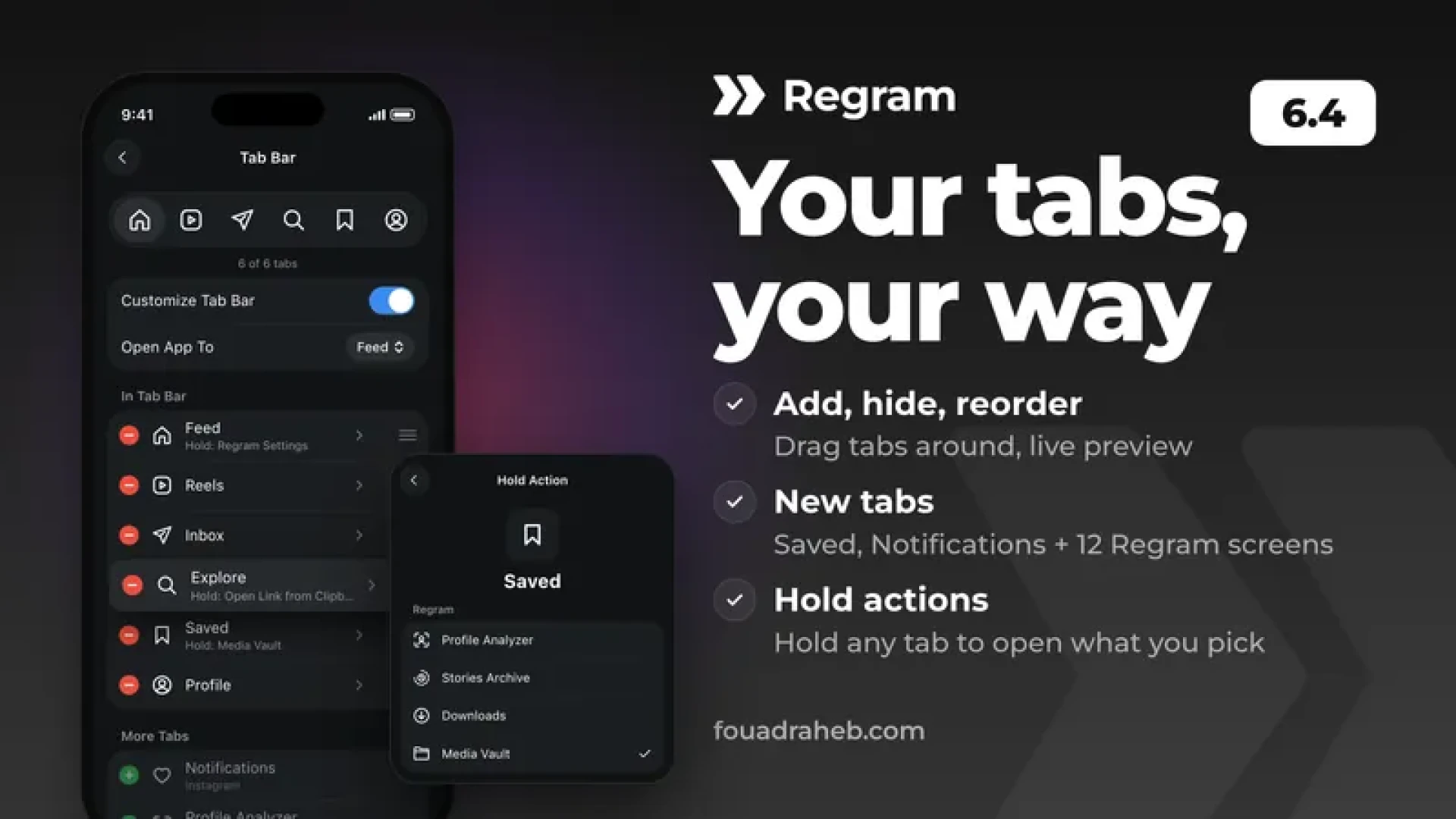
Redesigned Tab Bar editor: live preview, add or hide tabs with + and −, and changes apply without relaunching.
Tab Bar: add custom tabs, like IG's Saved and Notifications or Regram screens such as the Vault, Downloads and Settings.
Tab Bar: hold any tab to open a screen of your choice (Home still opens Regram Settings).
Detect IG Links moved to the Tab Bar editor as Explore's hold action (your setting carries over).
Stacked Toast notifications now share one width instead of zig-zagging.
Downloads: filter chips above the list, plus a Select button to delete many downloads at once, with or without their media.
Fixed Hide Chats and the DM refresh confirmation not working on IG's new chats list.
Fixed video Instants downloading as a photo.
Fixed IG crashing at launch on some accounts.
How to install and updateSideloadingDownload, sign and install this IPA file. (Duplicate IPA file)
If you are signing the app with AltStore using a free Apple ID, you need to use the Plugins-Removed IPA file.
If you're updating from an older version, make sure to use the same signing certificate as your existing installed version so you're able to update without deleting.
Push notifications require signing the app with a distribution certificate (Check this guide on how to receive notifications), (Flekstore is one of the most reliable options for sideloading).
You can also download the apps directly from our Sideloading sources:
https://altstore.fouadraheb.com for AltStore/SideStore
https://source.fouadraheb.com for Flekstore/Feather/ESign/Gbox
Jailbreak (iOS 14 - 17.3.1)Regram supports iOS 14+, but since IG 411.0 and newer supports only iOS 16.3+, some features on iOS 14/15 are not supported or won't work properly.
Add https://apt.fouadraheb.com to your package manager's sources and download Regram from there.
TrollStore (iOS 14 - 16.6)Download this IPA file and open in TrollStore app to install or upgrade your existing version.
How to enable Open in Regram Safari ExtensionGo to the Settings app > find and select Safari settings
If you see "Default Browser App", change it to make sure Safari is your default browser
Then go to Extensions > Open in Regram > Enable "Allow Extension" and set permissions to "Allow" for all available domains
That's it! Now every time Safari detects an IG URL it will show an Open in Regram alert which opens in Regram.
Help & SupportJoin the Regram channel on Discord (discord.gg/8z3zY93).
Use the Contact Support button from inside Regram settings.
You can access Regram settings by long-pressing on Home button from tab bar or from inside IG settings.
As always, feel free to reach out if you have any questions or feedback.
Thank you, patrons!
Your support keeps Regram growing, and something new is on the way What's new in this update?
Bug fixes and compatibility updates for IG 450.1.
New Story Playback Controls: speed, scrubbing, skip, volume, mute, Picture in Picture, save frame and next person for stories. Open with a long-press on •••, the new playback button or the action button. Stop Auto Advance moved there too.
Reels Playback Controls: new previous/next reel and skip buttons (5s by default). When paused, skip steps one frame; hold to repeat. Also available as floating button actions.
New Media Watch (Profile Tracking): watched accounts can have their new stories, posts, reels and profile pictures saved automatically, shown in the events list and viewable there.
New per-account Media screen: all saved media by type, a Deleted filter, full-screen viewer, and export to Photos or the Vault.
Profile Tracking now centers on the Watchlist: it opens on Watchlist | Changes, and recording profile visits is optional (off by default).
Profile Tracking: now tracks links and their titles, pronouns, category, account type and contact info.
Profile Tracking: fixed false profile picture changes, mostly on accounts without a picture.
New Save All Media on the profile action button: posts, carousels, reels, stories and the profile picture in bulk.
Instants: new Manually Mark as Seen. Viewed instants stay unseen until you tap the eye button.
Reel Buttons: hide IG's new Save button on Reels, or just its count.
Redesigned Tab Bar editor: live preview, add or hide tabs with + and −, and changes apply without relaunching.
Tab Bar: add custom tabs, like IG's Saved and Notifications or Regram screens such as the Vault, Downloads and Settings.
Tab Bar: hold any tab to open a screen of your choice (Home still opens Regram Settings).
Detect IG Links moved to the Tab Bar editor as Explore's hold action (your setting carries over).
Stacked Toast notifications now share one width instead of zig-zagging.
Downloads: filter chips above the list, plus a Select button to delete many downloads at once, with or without their media.
Fixed Hide Chats and the DM refresh confirmation not working on IG's new chats list.
Fixed video Instants downloading as a photo.
Fixed IG crashing at launch on some accounts.
How to install and updateSideloadingDownload, sign and install this IPA file. (Duplicate IPA file)
If you are signing the app with AltStore using a free Apple ID, you need to use the Plugins-Removed IPA file.
If you're updating from an older version, make sure to use the same signing certificate as your existing installed version so you're able to update without deleting.
Push notifications require signing the app with a distribution certificate (Check this guide on how to receive notifications), (Flekstore is one of the most reliable options for sideloading).
You can also download the apps directly from our Sideloading sources:
https://altstore.fouadraheb.com for AltStore/SideStore
https://source.fouadraheb.com for Flekstore/Feather/ESign/Gbox
Jailbreak (iOS 14 - 17.3.1)Regram supports iOS 14+, but since IG 411.0 and newer supports only iOS 16.3+, some features on iOS 14/15 are not supported or won't work properly.
Add https://apt.fouadraheb.com to your package manager's sources and download Regram from there.
TrollStore (iOS 14 - 16.6)Download this IPA file and open in TrollStore app to install or upgrade your existing version.
How to enable Open in Regram Safari ExtensionGo to the Settings app > find and select Safari settings
If you see "Default Browser App", change it to make sure Safari is your default browser
Then go to Extensions > Open in Regram > Enable "Allow Extension" and set permissions to "Allow" for all available domains
That's it! Now every time Safari detects an IG URL it will show an Open in Regram alert which opens in Regram.
Help & SupportJoin the Regram channel on Discord (discord.gg/8z3zY93).
Use the Contact Support button from inside Regram settings.
You can access Regram settings by long-pressing on Home button from tab bar or from inside IG settings.
As always, feel free to reach out if you have any questions or feedback.

Comments (0)