Page 1 failed to load.
Voxta - Voxta v1.11.0: Content Hub, Workspaces & Portrait Animation
 More from Voxta
Voxta - Gerald part 3: a love poem
About This Title
Hello everyone,
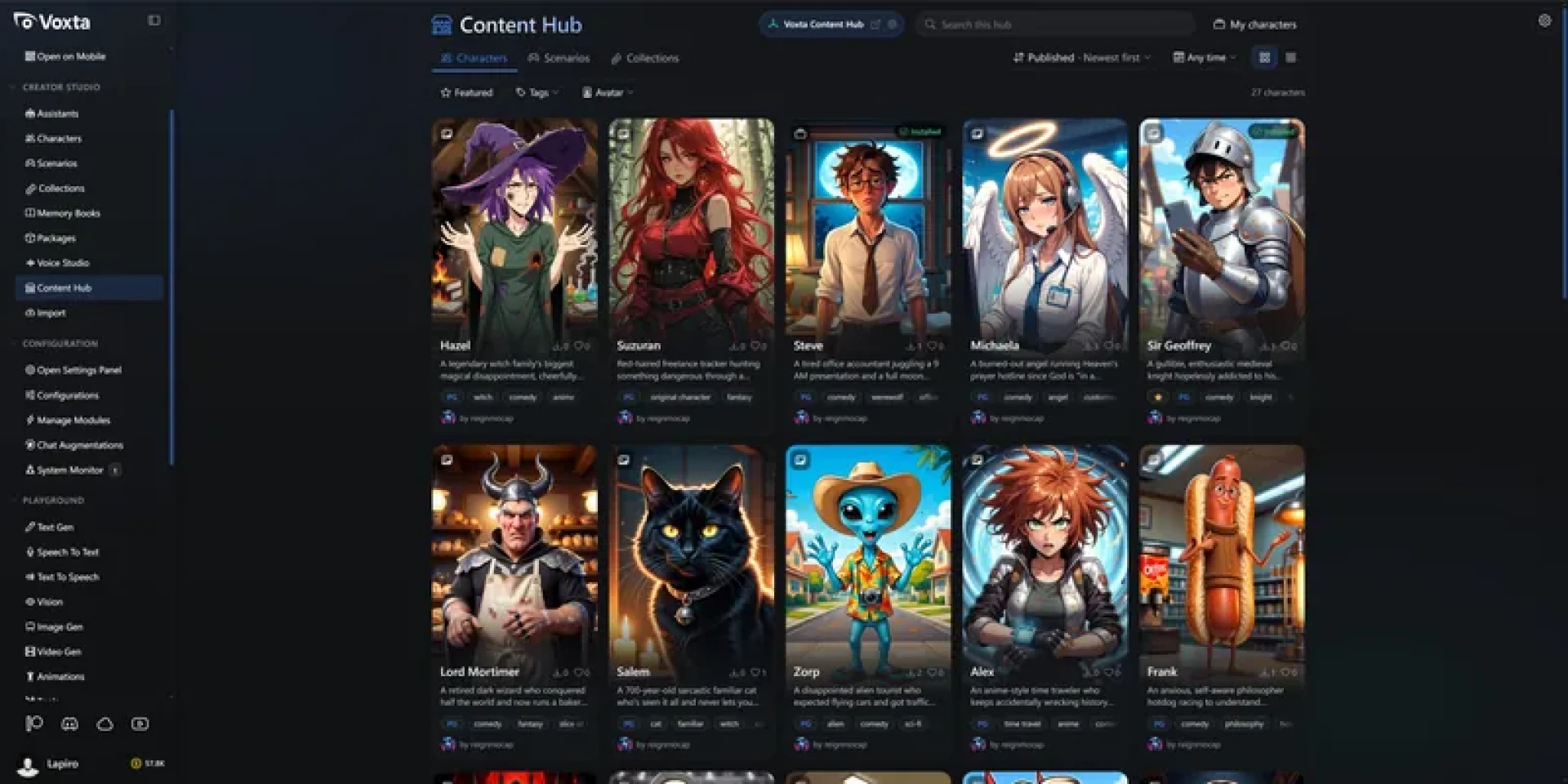
This is the biggest release yet. The Content Hub is a new way to get content right inside Voxta: browse, search and install characters, scenarios and packs, and share your own with the community. Workspaces give a chat a real folder on disk that the AI can read, write and work in, from a new Work page with a file tree beside the chat, and tool calling got a security pass to match. Portrait Animation makes a character's picture speak along with its voice. Decisions, a Discord bot, WAN 2.2 video, expression generation and a web UI reworked for phones fill out the rest.
Python was updated to 3.14, so expect a large download after installing: Python modules are reinstalled once after the upgrade.
There is a lot to dig into, so let's get started.
Content HubInstalled by default and available in the menu.
Browse, search and install characters, scenarios and packs, with creator profiles
Choose which kind of content you allow in the module configuration
Share your own content with the community
Browse it on the web too, at https://hub.voxta.ai/
WorkspacesA chat can now have a folder on disk that the AI reads, writes and edits files in, runs commands and launches programs from.
The new Work page starts and resumes work in a workspace, with the folder chosen before the chat
A files browser in the right panel, with editing and deleting for text files and viewing for images
Shell commands (Bash and PowerShell) and a Python tool for assistants
Optional notifications when an assistant is done, integrated with Windows and Android notifications
Tool Calling SecurityWorkspaces put a lot of power in a model's hands, so tool calling got a security pass.
When Allow All is enabled, destructive calls are reviewed before they run
Tool calls are screened by what they actually read and write, and secret reads the path rules could not see are flagged
Web fetch checks with allow and deny lists, and redirect chains are inspected
Revoke allowed tools, or list every tool to grant or revoke access ahead of time
API keys have scopes, and device sign-in asks only for the scopes it needs
Requests coming through a tunnel on this machine count as remote
Shared accounts: several people can use one account, each with their own sign-in (when Users Management is enabled)
DecisionsA new service type answers multiple-choice questions, such as who speaks next, which action to take or whether a tool call may run, with a model that returns an option instead of text. It answers in well under a second for a fraction of the price, and is enabled by default on Voxta Cloud.
Served through Voxta Cloud and OpenRouter's Decisions API
Decisions mode for ExLlamaV3 and llama.cpp: Gemma 4 12B decisions run about 3.4 times faster with 99% letter-probability
Chat flow and tool call review always use decisions when enabled, and action inference uses them when no action in the layer takes arguments
A typesafe Jev-compatible API to run decisions against your running Voxta instance
Portrait Animation & ExpressionsA character's picture speaks along with its voice, driven by the new Ditto module
Portrait animation is drawn in the app, and can be tested from the service tests with a voice
Generate expression image assets in a character's Assets tab
Emotes and States work without a scenario, for example Normal and Sitting, or a new Aggressive state
Discord BotPut a character in your Discord channels, with a character and scenario per channel
A cost limit per channel
Built on new bot sessions (Chat Bridges)
Image & Video GenerationWAN 2.2 video generation inside Voxta
The image viewer can edit any image with a prompt, or turn it into a video
Video cropping, and video generation jobs can resume
ComfyCloud supports img2img, video generation, workflow upload and LoRA panels
Local Diffusers supports Z-Image Turbo and Anima
Krea 2, Qwen Image Edit and Local Diffusers use less memory and run faster, especially with LoRAs
Sprint mode in /imagine for native transparency output with Qwen Image Edit and Local Diffusers
New Upscaler module (Spandrel, chaiNNer, ESRGAN and others)
Image models and LoRAs show a preview thumbnail and label from Civitai
Generated images default to the character's avatar
KoboldCpp video generation (untested)
VoicesFavorite voices in Voices Studio and the voice picker
Change voice shortcut on the character menu
ElevenLabs V4, and Cartesia Sonic 3.6 on Voxta Cloud
Faster Python voices warmup
Chat & CharactersCompanion characters have a dedicated prompt to reduce hallucinations
Options to generate Say and Do (event) actions in a chat
A scenario can share chat history with characters who were away
Tool results stay in the prompt until summarization, and a tool timeout or model failure no longer loses the turn
Memory book entries can be edited while a chat is writing, and memory books support thumbnails
The built-in Voxta memory book is now actual documentation
Two chats can no longer share the same chat or memory book
Scripts support setTimeout and setInterval
Disabling explicit content now covers more of the app
Some built-in characters were removed
Models & PerformancePython 3.14.7, llama.cpp 0.4.1 with MTP draft support, ExLlamaV3 1.5.4 and ONNX Runtime 1.30.0
The Models folder was reorganized, and the models browser has filtering
NovelAI was removed, along with PythonNet, reducing memory and download size
Voxta Cloud adds background removal and upscaling services
Voxta Cloud sign-ins are kept alive and renewed
A refused model load shows its VRAM breakdown
Clearer errors when max tokens is higher than the context window, and when a reply ran out of tokens or was cut short
MCP tool images reach the model at their original size, and are only scaled down past what the provider refuses
Voxta UIRedesigned right panel, Add Module pages and Character Preview page
An "Add features" link in the right panel, and modules that are not configured are hidden
See your Voxta Cloud credits in the left panel
Launching a character that needs an uninstalled augmentation says so and offers to install it
Startup modals step through new versions, Python package updates and migrations
Errors are sorted into unexpected, fixable by you, or the scenario's fault, and the error dialog shows how to fix them
The Assistants page lists only assistants, marks the default one and can change it
Reasoning moved into the model picker
VRM rendering is capped at 60 fps
Voxta DesktopWindows notifications
Better performance on high refresh rate displays
VRM popout: mic and voice toggles, resize, context menu, lock button and a saved position
Voxta MobileThe whole web UI was reworked for phones: drawers, cards and bottom sheets instead of squeezed desktop tables.
Lists, editors and settings open as master-detail drawers
Chats, accounts, API keys, resources and tables are shown as cards
Filters, menus and split buttons open as bottom sheets
The vision, text to speech and speech to text playgrounds are step-by-step flows, and the vision playground opens the real camera
Name prompts stay clear of the keyboard, sliders are dragged by the knob, and the image viewer no longer flickers while pinching
Android notifications
Pair the mobile app with your PC from a QR code
Voxta SDKWorkspaces support
Voxta.Model targets .NET Standard 2.1 for Unity support
Ticket based WebSocket authentication
Tool calling control API
API key scopes
Voxta LiteNew to Voxta? Lite is free and runs on Voxta Cloud, so you can create an account and start chatting without any local setup. If you like it, a subscription gets you the full version, with a large library of integrations, custom modules, and the option to run everything on your own hardware.
This post also rolls up v1.10.3, and both versions carry a long list of stability and polish fixes, across tool-using turns, image generation, audio and Linux.
Thank you all, as always, for the continued support and feedback. Whether you are installing your first character from the Content Hub, handing an assistant a folder to work in, or watching a portrait speak along with its voice, we hope you enjoy this release.
Browse the Content Hub at: https://hub.voxta.ai/
Voxta is available to subscribers at: https://portal.voxta.ai/
Hello everyone,
This is the biggest release yet. The Content Hub is a new way to get content right inside Voxta: browse, search and install characters, scenarios and packs, and share your own with the community. Workspaces give a chat a real folder on disk that the AI can read, write and work in, from a new Work page with a file tree beside the chat, and tool calling got a security pass to match. Portrait Animation makes a character's picture speak along with its voice. Decisions, a Discord bot, WAN 2.2 video, expression generation and a web UI reworked for phones fill out the rest.
Python was updated to 3.14, so expect a large download after installing: Python modules are reinstalled once after the upgrade.
There is a lot to dig into, so let's get started.
Content HubInstalled by default and available in the menu.
Browse, search and install characters, scenarios and packs, with creator profiles
Choose which kind of content you allow in the module configuration
Share your own content with the community
Browse it on the web too, at https://hub.voxta.ai/
WorkspacesA chat can now have a folder on disk that the AI reads, writes and edits files in, runs commands and launches programs from.
The new Work page starts and resumes work in a workspace, with the folder chosen before the chat
A files browser in the right panel, with editing and deleting for text files and viewing for images
Shell commands (Bash and PowerShell) and a Python tool for assistants
Optional notifications when an assistant is done, integrated with Windows and Android notifications
Tool Calling SecurityWorkspaces put a lot of power in a model's hands, so tool calling got a security pass.
When Allow All is enabled, destructive calls are reviewed before they run
Tool calls are screened by what they actually read and write, and secret reads the path rules could not see are flagged
Web fetch checks with allow and deny lists, and redirect chains are inspected
Revoke allowed tools, or list every tool to grant or revoke access ahead of time
API keys have scopes, and device sign-in asks only for the scopes it needs
Requests coming through a tunnel on this machine count as remote
Shared accounts: several people can use one account, each with their own sign-in (when Users Management is enabled)
DecisionsA new service type answers multiple-choice questions, such as who speaks next, which action to take or whether a tool call may run, with a model that returns an option instead of text. It answers in well under a second for a fraction of the price, and is enabled by default on Voxta Cloud.
Served through Voxta Cloud and OpenRouter's Decisions API
Decisions mode for ExLlamaV3 and llama.cpp: Gemma 4 12B decisions run about 3.4 times faster with 99% letter-probability
Chat flow and tool call review always use decisions when enabled, and action inference uses them when no action in the layer takes arguments
A typesafe Jev-compatible API to run decisions against your running Voxta instance
Portrait Animation & ExpressionsA character's picture speaks along with its voice, driven by the new Ditto module
Portrait animation is drawn in the app, and can be tested from the service tests with a voice
Generate expression image assets in a character's Assets tab
Emotes and States work without a scenario, for example Normal and Sitting, or a new Aggressive state
Discord BotPut a character in your Discord channels, with a character and scenario per channel
A cost limit per channel
Built on new bot sessions (Chat Bridges)
Image & Video GenerationWAN 2.2 video generation inside Voxta
The image viewer can edit any image with a prompt, or turn it into a video
Video cropping, and video generation jobs can resume
ComfyCloud supports img2img, video generation, workflow upload and LoRA panels
Local Diffusers supports Z-Image Turbo and Anima
Krea 2, Qwen Image Edit and Local Diffusers use less memory and run faster, especially with LoRAs
Sprint mode in /imagine for native transparency output with Qwen Image Edit and Local Diffusers
New Upscaler module (Spandrel, chaiNNer, ESRGAN and others)
Image models and LoRAs show a preview thumbnail and label from Civitai
Generated images default to the character's avatar
KoboldCpp video generation (untested)
VoicesFavorite voices in Voices Studio and the voice picker
Change voice shortcut on the character menu
ElevenLabs V4, and Cartesia Sonic 3.6 on Voxta Cloud
Faster Python voices warmup
Chat & CharactersCompanion characters have a dedicated prompt to reduce hallucinations
Options to generate Say and Do (event) actions in a chat
A scenario can share chat history with characters who were away
Tool results stay in the prompt until summarization, and a tool timeout or model failure no longer loses the turn
Memory book entries can be edited while a chat is writing, and memory books support thumbnails
The built-in Voxta memory book is now actual documentation
Two chats can no longer share the same chat or memory book
Scripts support setTimeout and setInterval
Disabling explicit content now covers more of the app
Some built-in characters were removed
Models & PerformancePython 3.14.7, llama.cpp 0.4.1 with MTP draft support, ExLlamaV3 1.5.4 and ONNX Runtime 1.30.0
The Models folder was reorganized, and the models browser has filtering
NovelAI was removed, along with PythonNet, reducing memory and download size
Voxta Cloud adds background removal and upscaling services
Voxta Cloud sign-ins are kept alive and renewed
A refused model load shows its VRAM breakdown
Clearer errors when max tokens is higher than the context window, and when a reply ran out of tokens or was cut short
MCP tool images reach the model at their original size, and are only scaled down past what the provider refuses
Voxta UIRedesigned right panel, Add Module pages and Character Preview page
An "Add features" link in the right panel, and modules that are not configured are hidden
See your Voxta Cloud credits in the left panel
Launching a character that needs an uninstalled augmentation says so and offers to install it
Startup modals step through new versions, Python package updates and migrations
Errors are sorted into unexpected, fixable by you, or the scenario's fault, and the error dialog shows how to fix them
The Assistants page lists only assistants, marks the default one and can change it
Reasoning moved into the model picker
VRM rendering is capped at 60 fps
Voxta DesktopWindows notifications
Better performance on high refresh rate displays
VRM popout: mic and voice toggles, resize, context menu, lock button and a saved position
Voxta MobileThe whole web UI was reworked for phones: drawers, cards and bottom sheets instead of squeezed desktop tables.
Lists, editors and settings open as master-detail drawers
Chats, accounts, API keys, resources and tables are shown as cards
Filters, menus and split buttons open as bottom sheets
The vision, text to speech and speech to text playgrounds are step-by-step flows, and the vision playground opens the real camera
Name prompts stay clear of the keyboard, sliders are dragged by the knob, and the image viewer no longer flickers while pinching
Android notifications
Pair the mobile app with your PC from a QR code
Voxta SDKWorkspaces support
Voxta.Model targets .NET Standard 2.1 for Unity support
Ticket based WebSocket authentication
Tool calling control API
API key scopes
Voxta LiteNew to Voxta? Lite is free and runs on Voxta Cloud, so you can create an account and start chatting without any local setup. If you like it, a subscription gets you the full version, with a large library of integrations, custom modules, and the option to run everything on your own hardware.
This post also rolls up v1.10.3, and both versions carry a long list of stability and polish fixes, across tool-using turns, image generation, audio and Linux.
Thank you all, as always, for the continued support and feedback. Whether you are installing your first character from the Content Hub, handing an assistant a folder to work in, or watching a portrait speak along with its voice, we hope you enjoy this release.
Browse the Content Hub at: https://hub.voxta.ai/
Voxta is available to subscribers at: https://portal.voxta.ai/

Comments (0)