
RahvanR1 - R1 Suite Update: Custom Driver Animations, Gestures & More part 2
 Up next
SirenSins - Galko-Chan's Last Time
About This Title
Big one this time. Here’s what’s new.
Custom Driver Animations
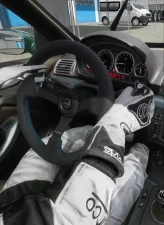
You can now make the driver reach out for the stuff in your car. Click a switch, knob or button in the cockpit, pick what triggers it (lights, wipers, horn, indicators, extra switches and more) and pick a hand animation (press, flip, dial, pinch, palm) so driver reaches over and works it visually whenever you use that control.
Gesture Animations
Three gestures you can assign on keys in Settings: thumbs up at the window, cheering, and frustrated.
Save to the car
You could already save animations to a skin. Now you can save them to the car itself too, so anyone using that car sees them, even without the app. There’s also a Save driver to the car button to change the car's default driver position.
Car Setup
No more manual setup walk-through. Each part (throttle, brake, clutch, gear lever, handbrake) has its own Add / Remove, so you only fix the one that’s wrong. Steering wheel parts can be picked too.
Other new stuff
Left foot rest position: on the brake pedal or on the clutch.
Cabin smoke Quality slider, if you need to adjust for the performance. It shouldn't make any difference with modern computers.
Driver Left / right slider goes to ±100 cm, so you can move the driver to the other seat (left-hand drive to right-hand drive)
Settings → Hide Apps: hide the modules you don’t use on the R1 Suite.
Fixes
Game crashing on older CSP versions with the driver animation on, or with an animation saved to the car.
The game froze for about 3 seconds when an update came in.
Links (Login, Patreon etc) open in your real browser instead of the in-game one.
The feet press the pedals even on cars where the pedals themselves don’t move.
Handbrake now shows in replays while the session is still running.
Cabin smoke no longer leaks out of open windows or gaps.
Cabin camera Turn left / right slider fixed.
To update: start AC once and restart, the app updates itself.
Big one this time. Here’s what’s new.
Custom Driver Animations
You can now make the driver reach out for the stuff in your car. Click a switch, knob or button in the cockpit, pick what triggers it (lights, wipers, horn, indicators, extra switches and more) and pick a hand animation (press, flip, dial, pinch, palm) so driver reaches over and works it visually whenever you use that control.
Gesture Animations
Three gestures you can assign on keys in Settings: thumbs up at the window, cheering, and frustrated.
Save to the car
You could already save animations to a skin. Now you can save them to the car itself too, so anyone using that car sees them, even without the app. There’s also a Save driver to the car button to change the car's default driver position.
Car Setup
No more manual setup walk-through. Each part (throttle, brake, clutch, gear lever, handbrake) has its own Add / Remove, so you only fix the one that’s wrong. Steering wheel parts can be picked too.
Other new stuff
Left foot rest position: on the brake pedal or on the clutch.
Cabin smoke Quality slider, if you need to adjust for the performance. It shouldn't make any difference with modern computers.
Driver Left / right slider goes to ±100 cm, so you can move the driver to the other seat (left-hand drive to right-hand drive)
Settings → Hide Apps: hide the modules you don’t use on the R1 Suite.
Fixes
Game crashing on older CSP versions with the driver animation on, or with an animation saved to the car.
The game froze for about 3 seconds when an update came in.
Links (Login, Patreon etc) open in your real browser instead of the in-game one.
The feet press the pedals even on cars where the pedals themselves don’t move.
Handbrake now shows in replays while the session is still running.
Cabin smoke no longer leaks out of open windows or gaps.
Cabin camera Turn left / right slider fixed.
To update: start AC once and restart, the app updates itself.
Comments (0)